









12 Angry Men Transcript Overview
You've found yourself searching for a mens size chart, perhaps for a specific item or to understand the sizing standards better. This chart is a handy tool, offering a quick and visual way to navigate clothing and shoe sizes, especially when you need to get the right fit. It provides a simple reference, often with clear columns and rows, making it easy to find your size and ensure a comfortable, well-fitted garment. While the values and formats may vary, depending on the brand or region, the mens size chart is a reliable starting point for anyone seeking a precise fit.
Understanding the Mens Size Chart
The mens size chart is a valuable tool for anyone looking to find the perfect fit for their clothing or footwear. It provides a standardized guide to help determine the right size for men's garments, ensuring a comfortable and well-tailored look. This chart simplifies the process of finding your size by offering a clear reference for various measurements.
Key Measurements Explained
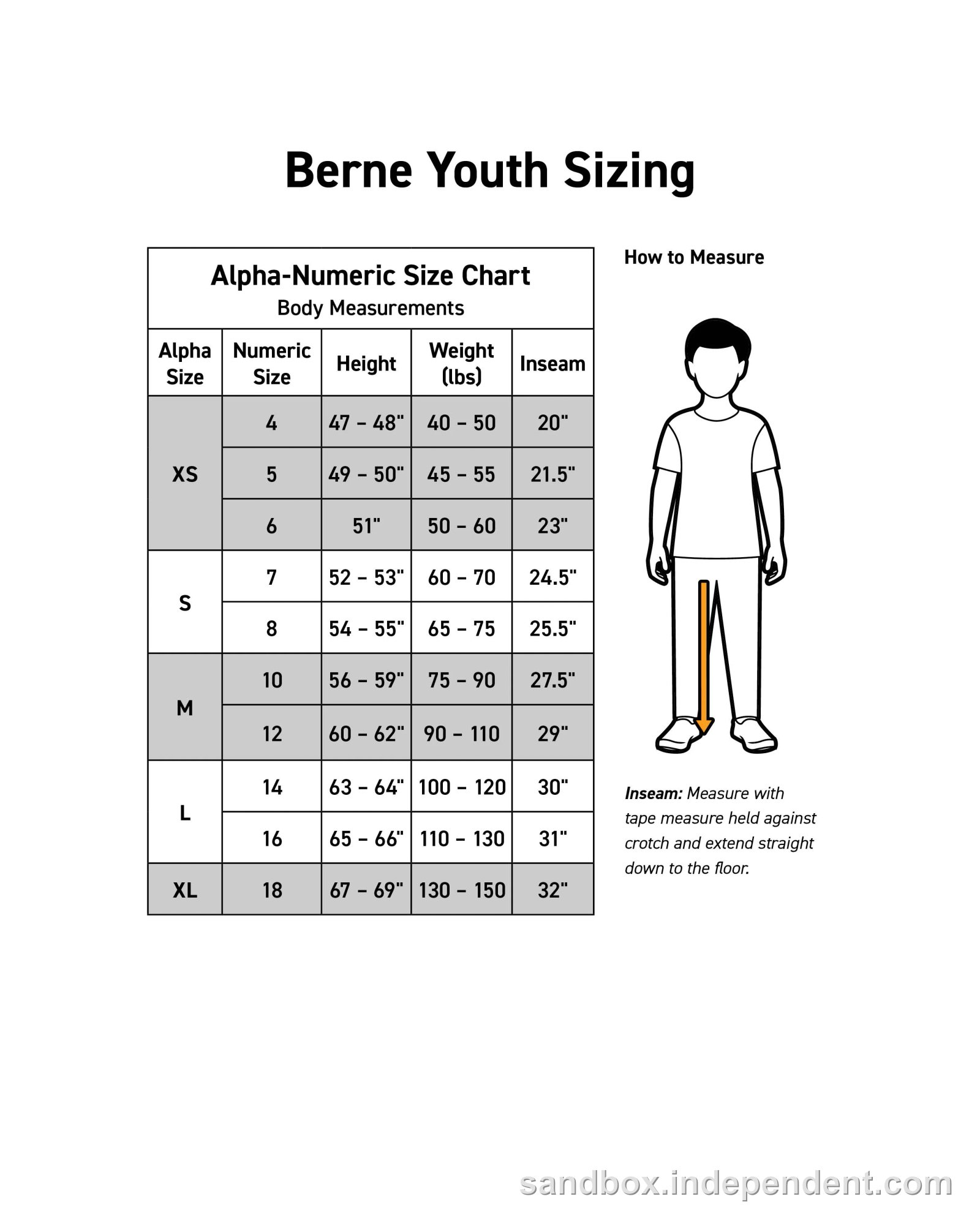
The mens size chart typically includes essential measurements such as chest, waist, and hip circumference, along with height and sometimes sleeve length. These measurements are presented in a tabular format, with columns indicating different sizes and rows for each measurement. The chart may also include a size guide, offering a quick reference for the corresponding measurements of each size.
Reading and Applying the Chart: A Step-by-Step Guide
Identify the measurement you need: Start by determining the specific measurement you want to find, whether it's chest size, waist size, or any other relevant dimension.
Locate the correct column: Find the column on the chart that corresponds to the size you believe you are. This is usually indicated by a size label, such as "Small," "Medium," or "Large."
Check the measurements: Within the chosen column, look for the row that matches the measurement you're seeking. For instance, if you're finding your chest size, locate the row labeled "Chest."
Compare and select: Compare the measurement on the chart with your own body measurements. If your measurement falls within the range provided, that size should be a good fit. If not, try the next size up or down and repeat the process until you find the closest match.
Consider other factors: While the chart provides a general guide, individual body shapes and preferences may vary. Consider factors like your desired fit (loose or fitted) and the style of the garment when making your final size selection.
Common Size Variations and Their Causes
Size charts can vary depending on several factors. One significant influence is the standard being used, as different regions and manufacturers may have their own sizing systems. For instance, a size "Medium" in the US may not align with a "Medium" in Europe. Additionally, the intended use of the garment can impact sizing; athletic wear, for example, often has a different fit compared to casual wear. It's essential to be aware of these variations and refer to the specific size chart provided by the brand or retailer.
Mistakes to Avoid and How to Get it Right
A common mistake is relying solely on your usual size without considering the specific brand or style. Each brand may have its unique sizing, so it's crucial to refer to the provided size chart. Additionally, ensure you measure yourself accurately, as slight variations can make a difference in finding the perfect fit. Always double-check the measurements against the chart to avoid any sizing errors.
Tips for Accurate Sizing and a Perfect Fit
To ensure an accurate fit, measure yourself with a flexible tape measure. Take your measurements while wearing minimal clothing to get the most precise results. If you're between sizes, consider the fabric and style of the garment. Some materials have more give, allowing for a slightly looser fit, while others may be more structured and require a precise size match. Don't be afraid to try on different sizes and trust your judgment based on the provided size chart and your own comfort.
While we've covered the essentials, it's worth noting that the specifics of size charts can vary, so it's always a good idea to double-check the source and ensure you're using the right measurements for your context.
Don't worry, though; with a bit of practice, reading and applying size charts will become second nature. If you ever need a quick refresher, feel free to revisit this guide or explore our other helpful references. It's always good to have these tools at your fingertips!
Related: Insert rose flower cliparts in Word documents quickly
Many users assume they need to download extra files to get rose flower cliparts in Office. In reality, the built‑in clip art library already contains them, and you can insert them directly into Excel or Word.
If you’re adding a graphic to PowerPoint or setting a background in Teams, just use the Insert Picture feature or the clip art browser. The same images are available across Microsoft 365 clip art, so you don’t have to search elsewhere. Depending on your version, the menu labels might vary slightly, but the process stays simple.
Insert picture Excel with rose flower cliparts
The built‑in clip art library already includes rose flower cliparts. You can insert them directly into Excel, Word, or PowerPoint without extra downloads.
In Excel, go to Insert > Picture > This Device, browse the clip art folder and select a PNG rose file. The same steps work in Word and PowerPoint using Insert > Pictures > Stock Images.
The Microsoft 365 clip art collection appears in all Office apps, so you can reuse the rose graphic across documents. Menu labels may vary, but Insert > Picture is the consistent entry point.
If the rose design doesn’t appear, ensure you’re online and signed into a Microsoft 365 account. This opens the online library where the rose images are stored.
For faster access, press Alt+N, P to open the Insert Picture dialog directly. You can also type “rose” in the search box to filter results instantly.
Clip art library requirements: version and account type
The clip art library is included with Office 2019 and Microsoft 365, so no separate download is required for rose flower designs. To use the online library you need a Microsoft 365 subscription and an internet connection; a free Microsoft account also works for the web version.
In corporate environments the online clip art feature can be disabled via policy. If the rose images are missing, ask IT to enable the Microsoft 365 clip art service.
If you’re on an older Office version such as 2016, the offline set may not contain the rose. You can still use the online library by signing in.
When you select the rose from the library, the file is a PNG that can be resized without loss of quality. You can then drag it onto any slide for a polished look with rose flower cliparts.
Step‑by‑step OneNote drawing with rose flower cliparts
To add a rose graphic in OneNote, open the app and choose Insert > Picture > This Device (or Stock Images for the online library). Browse to the clip art folder and select a PNG rose file.
Open OneNote and select the target page.
Click Insert > Picture > This Device (or Stock Images) and locate the rose PNG.
Select the rose file and insert it onto the page.
Resize or reposition using the picture handles as needed.
Save the page; the rose clip art is now part of your OneNote drawing.
If the rose doesn’t appear, confirm you’re online and signed into a Microsoft 365 account; otherwise the offline clip art may not include the design. You can also paste a copied rose image directly into OneNote for immediate use.
Signature image Outlook issues and fixes
When you add a rose clipart as an Outlook signature, the image may disappear or leave the signature blank. This often happens if the file size or format isn’t compatible.
- Signature image exceeds Outlook’s 30 KB size limit.
- File format isn’t supported (e.g., transparent GIF).
- Signature set to plain text only.
- Microsoft 365 clip art service disabled by policy.
To fix, resize the PNG under 30 KB, use a supported format like PNG or JPG, and switch the signature format to HTML or RTF. After saving, test the signature in a new message.
If the problem persists, verify you’re online and signed into a Microsoft 365 account; otherwise the rose image won’t load. After correction, the same rose clip art can be reused in other Office apps.
Slide design PowerPoint best practice with rose flower cliparts
The built‑in clip art library already includes rose flower cliparts, so you can insert them directly into PowerPoint without extra downloads. Use Insert > Pictures > Stock Images to browse the library.
Start with the high‑resolution rose from the Microsoft 365 clip art library for a clean slide design. This ensures the graphic looks sharp when projected.
If you use a custom rose, insert it via Insert > Picture > This Device, then set the picture’s fill to “Aspect Ratio” in Picture Format. Resizing this way prevents distortion.
Add the rose to the slide master’s header area so it appears on all new slides automatically. You can also copy the PNG to a shared folder for consistent branding across presentations.
Give it a go on a spare worksheet or a test slide first, just to be safe. If everything looks right, you can apply the same steps to your actual file. Menus might look a bit different depending on your version, but the ideas stay the same.
When you need this again, just bookmark the page and you’ll have it handy. Happy editing!
Related: Construction Management Companies Essential Guide
Top construction management companies are a key part of any major building project, but when you're not in the industry, it can be hard to know where to start. So, let's break it down and explore what these companies do and why they matter.
What's the Deal with Top Construction Management Companies?
These companies are the experts who oversee the entire construction process, from planning and budgeting to managing contractors and ensuring the work is completed on time and to a high standard. They're like the conductors of an orchestra, keeping everything in harmony and on beat.
When you're taking on a big building project, whether it's a new home, a renovation, or a commercial development, you want to make sure it's done right. That's where these companies come in. They bring a wealth of experience and knowledge to the table, ensuring your project runs smoothly and efficiently.
Hiring the Right Team
When it comes to hiring a top construction management company, there are a few key things to consider. First, check their track record and experience. You want a company that has a proven history of successful projects, especially in the type of work you need. Ask for references and take the time to call and chat with previous clients.
Next, look at their team. A good company will have a range of skilled professionals, from project managers and estimators to site supervisors and safety officers. Make sure they have the right people for the job and that their team is well-organized and communicates effectively.
Finally, get quotes from a few different companies. Compare their proposals, not just on price, but also on the scope of work, timeline, and any guarantees or warranties they offer. A detailed, itemized quote is a good sign that they've thought through the project thoroughly.
Company Names and the Industry
In the construction industry, company names can be a bit of a giveaway. Often, they'll include the founder's name, a reference to the type of work they do, or a unique, memorable phrase. For example, "Smith & Sons Construction" or "Blue Sky Builders."
When coming up with a name for your construction business, think about what makes you unique and how you can stand out. Keep it simple, memorable, and reflective of your brand. And don't forget to check name availability and secure the right domain and local registration before you start using it.
Industry Insights and Tools
The construction industry has its own language and tools. One you might have heard of is RSMeans, a popular cost database and estimating tool. It's a go-to resource for many in the industry, providing accurate cost information for a range of construction projects.
Other tools and topics to be aware of include escalation, which refers to the increase in construction costs over time, and the cost indexes, which track and predict these changes. These tools are essential for accurate budgeting and forecasting, especially on larger, long-term projects.
Taking the Next Step
If you're ready to dive into a construction project, whether it's a renovation or a new build, consider reaching out to a few top construction management companies in your area. They can provide valuable insights, help you navigate the process, and ensure your project is a success.
Remember, it's all about finding the right team for your vision and ensuring they have the skills and experience to bring your project to life.