


Budget Spreadsheet To Download Overview
Hey there! I was just thinking about how cool batman logo clipart is and how it can be used in so many fun ways. It's like a little piece of Batman magic that you can easily add to your projects or even just for fun. So, let's explore this simple yet awesome graphic element!
Batman logo clipart is basically a digital image, a vector graphic, that represents the iconic Batman logo. You know the one—the bold, black bat silhouette against a yellow background. It's a simple design, but it's instantly recognizable and has become an iconic symbol of the Batman universe. This clipart version is a digital file that you can download and use for various purposes.
The great thing about batman logo clipart is its versatility. It's not just for die-hard Batman fans; it can be used by anyone who wants to add a touch of superhero flair to their creations. Whether you're a graphic designer, a teacher, a parent, or just a fan of Batman, this clipart can be a fun and easy way to incorporate the Dark Knight into your work or hobbies.
A Quick Guide to Using Batman Logo Clipart
Using batman logo clipart is super simple. Once you've downloaded the file, you can open it in any image editing software or even a basic word processor. From there, you can resize it, change the colors, or even add text to personalize it. It's a great way to quickly add a professional-looking logo to your designs without having to create one from scratch.
You can use it for a variety of projects. For example, if you're a teacher, you could use it to create fun worksheets or classroom decorations with a superhero theme. Parents can use it to make personalized birthday invitations or party decorations for their little Batman fans. And for designers, it can be a quick and easy way to add a unique element to your work, whether it's for a client project or just for fun.
Get Creative!
There are so many ways to get creative with batman logo clipart. You could use it to make stickers, t-shirt designs, or even just as a fun wallpaper for your devices. The possibilities are endless, and it's a great way to show your love for Batman or add a bit of superhero style to your everyday life.
So, if you're looking for a fun and easy way to incorporate Batman into your world, batman logo clipart is definitely worth checking out. It's a simple graphic that can add a whole lot of fun and a touch of superhero magic to your projects!
Related: excel sum formula easy guide for fast totals
Understanding the Excel Sum Formula
The Excel Sum Formula is an essential tool for any Excel user, providing a simple yet powerful way to calculate sums and totals. Its versatility allows users to perform basic arithmetic operations and more advanced calculations with ease. By understanding and utilizing this formula, you can transform raw data into valuable insights, aiding in decision-making processes.
When employing the Excel Sum Formula, you initiate a series of calculations that aggregate data based on your specified criteria. This formula is particularly useful when dealing with large datasets, as it automates the process of adding up values, saving time and reducing the risk of errors. For instance, consider a scenario where you have a dataset containing sales data for various products over a month. You want to calculate the total sales for each product to identify the top-performing ones. The Excel Sum Formula comes to the rescue, allowing you to quickly sum up the sales figures for each product, providing a clear overview of your sales performance.
A Practical Example
Let's dive into a real-world application of the Excel Sum Formula in the context of a sales analysis. Imagine you're a marketing analyst, and you have a spreadsheet with columns for "Product", "Units Sold", and "Price per Unit". You want to calculate the total sales for each product to determine which products are performing well.
Here's a step-by-step guide:
- In a new column, labeled "Total Sales", input the formula
=SUM(Units Sold Price per Unit). - Ensure that the formula correctly references the "Units Sold" and "Price per Unit" columns. For example, if your data starts in row 2, the formula could be
=SUM(B2:B100C2:C100)where B and C represent the columns for "Units Sold" and "Price per Unit" respectively. - Drag the formula down to apply it to each row, calculating the total sales for each product.
Now, you have a column with the total sales for each product, allowing you to identify the top-selling products and make informed decisions regarding marketing strategies.
Common Mistake and How to Avoid It
One common mistake when using the Excel Sum Formula is failing to use absolute references when copying formulas across rows or columns. This can lead to incorrect calculations as the formula may reference unintended cells.
To avoid this mistake, use absolute references by adding a dollar sign ($) before the column and row references. For instance, if you want to lock the reference to column A and row 2, you would use $A$2. This ensures that when you copy the formula, it always refers to the same cell, regardless of its position in the spreadsheet.
Enhancing Your Excel Skills
Excel offers a wide range of features to enhance your data analysis capabilities. One such feature is the drop-down list, which can greatly improve the usability of your spreadsheets. By creating a drop-down list using the Data Validation feature, you can allow users to select from a predefined list of options, reducing data entry errors and ensuring consistency.
Additionally, the IF function is a powerful tool for conditional calculations. This function allows you to check a condition and return different values based on whether the condition is true or false. For example, you can use the IF function to highlight cells that meet certain criteria, automate data validation, or perform dynamic calculations based on specific conditions.
Final Thoughts
The Excel Sum Formula is a fundamental tool for data analysis, offering a simple and efficient way to calculate sums and totals. Its versatility and ease of use make it an indispensable skill for anyone working with data. As you continue to explore Excel's capabilities, you'll discover a wealth of advanced functions and features that will further enhance your data analysis skills. Remember, practice and experimentation are key to mastering Excel, so don't hesitate to dive deeper into its vast toolkit. Happy spreadsheeting and happy data analysis!
Related: Where's the Best Seat at the Cubs Game?
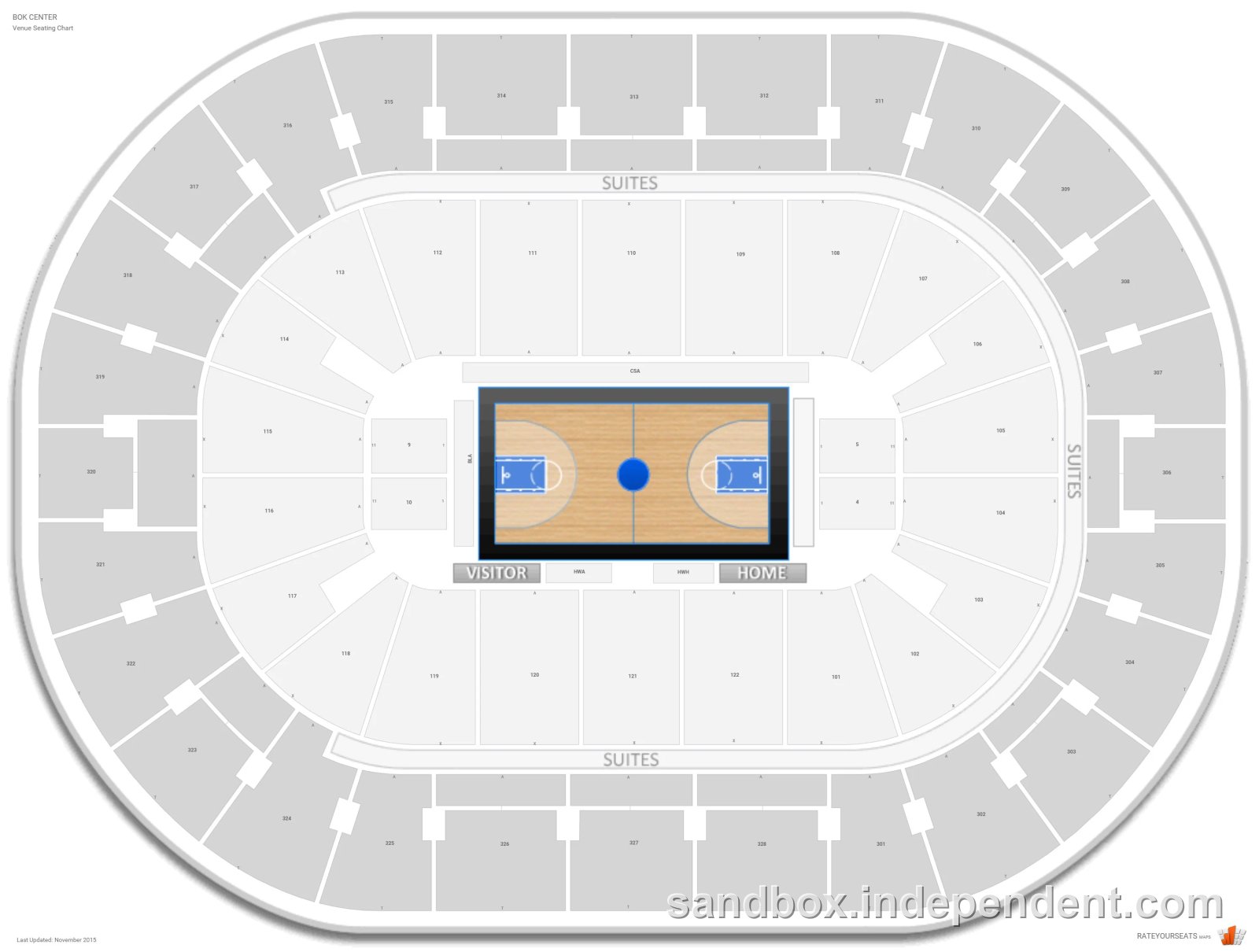
You're here because you need a straightforward answer, and the Cubs seating chart is a handy tool to have at your disposal. It's a simple yet effective visual guide, offering a clear layout of the stadium and its seats. This chart, whether it's for Wrigley Field or any other Cubs stadium, provides an essential reference for fans, offering a quick way to locate and understand their seats and the overall layout.
Understanding the Cubs Seating Chart
The Cubs seating chart is a visual guide that provides an overview of the seating arrangement at Wrigley Field, the home of the Chicago Cubs. This chart is an essential tool for fans and visitors, offering a clear and organized representation of the stadium's seating sections, rows, and seat numbers. By understanding the chart, you can easily navigate and choose your preferred seating location for an enjoyable game experience.
Comparing Seating Options and Standards
The Cubs seating chart typically follows a standardized format, ensuring consistency and ease of use. It categorizes seats into different sections, with each section further divided into rows and individual seats. The chart provides a visual representation of these categories, making it simple to identify and select your desired seats. The standard dimensions of each seat are usually included, ensuring a comfortable and uniform experience across the stadium.
Step-by-Step Guide to Using the Seating Chart
Using the Cubs seating chart is straightforward and can be done in a few simple steps:
- Familiarize yourself with the chart's layout. Identify the different sections, rows, and seat numbers.
- Determine your preferred seating area based on your budget, viewing preferences, and any specific requirements you may have.
- Check the seat dimensions and ensure they align with your comfort expectations.
- Choose your desired section and row, considering factors like proximity to the field, shade, or any other personal preferences.
- Confirm the seat numbers within your chosen row to ensure an uninterrupted view and a comfortable experience.
Avoiding Common Misreadings and Pitfalls
While the Cubs seating chart is designed for clarity, some common misreadings can occur. To avoid these pitfalls, keep the following in mind:
- Ensure you are referring to the correct chart for the specific game or event. Charts may vary slightly depending on the setup and seating arrangements for different occasions.
- Pay attention to the scale and dimensions provided. Misinterpreting these can lead to an inaccurate understanding of the seating layout.
- Be aware of any seat variations or exceptions, especially in premium or unique seating areas. These may have different configurations or seat numbers, so double-check the exact specifications.
Factors Affecting Accuracy and Real-World Use
Several factors can influence the accuracy and practicality of the Cubs seating chart:
- Weather conditions and natural elements can impact the viewing experience. Consider the sun's position and potential shade areas when choosing your seats.
- The stadium's design and architecture may create unique viewing angles or obstructions. Refer to detailed section views or row numbers to ensure an unobstructed view.
- Crowd size and the location of other fans can affect your overall experience. Opt for seats with a good balance of proximity to the action and personal space.
- Special events or promotions may alter the standard seating arrangements, so always check the latest chart for any updates.
Choosing the Right Seating Chart Format
The Cubs seating chart is available in various formats to cater to different needs and preferences:
- Standard printouts: These provide a clear and detailed view of the seating layout, suitable for most fans.
- Digital versions: Online charts offer interactive features, allowing you to zoom in and explore specific sections.
- Mobile-friendly charts: Designed for easy access on smartphones, these charts provide a convenient option for on-the-go planning.
- Section-specific charts: For a more detailed view, consider charts focused on individual sections, offering precise seat views and dimensions.
Keeping Your Reference Reliable for Future Use
To ensure the reliability and accuracy of your Cubs seating chart for future games or events:
- Regularly check for updates and new versions, especially if there are significant changes to the stadium layout or seating arrangements.
- Save or bookmark the latest digital charts for easy access and reference.
- If using a physical chart, consider laminating it to protect it from wear and tear, ensuring it remains legible and usable for multiple games.
- Share your feedback and experiences with the chart's providers, helping them improve and refine the seating chart for future seasons.
Well, that's a wrap on our exploration of the Cubs seating chart and its many practical applications. We've covered a lot of ground, from understanding the different options to ensuring accuracy and adapting the chart to your unique needs.
Remember, while this guide provides a solid foundation, it's always wise to double-check the specifics for your particular situation. Exact values and standards may vary, so a quick review ensures you're on the right track. Consider bookmarking this page for future reference; it's a handy tool to have at your fingertips when you need a quick reminder or a refresh on the process. Happy organizing!