


Calendar Template For Excel Overview
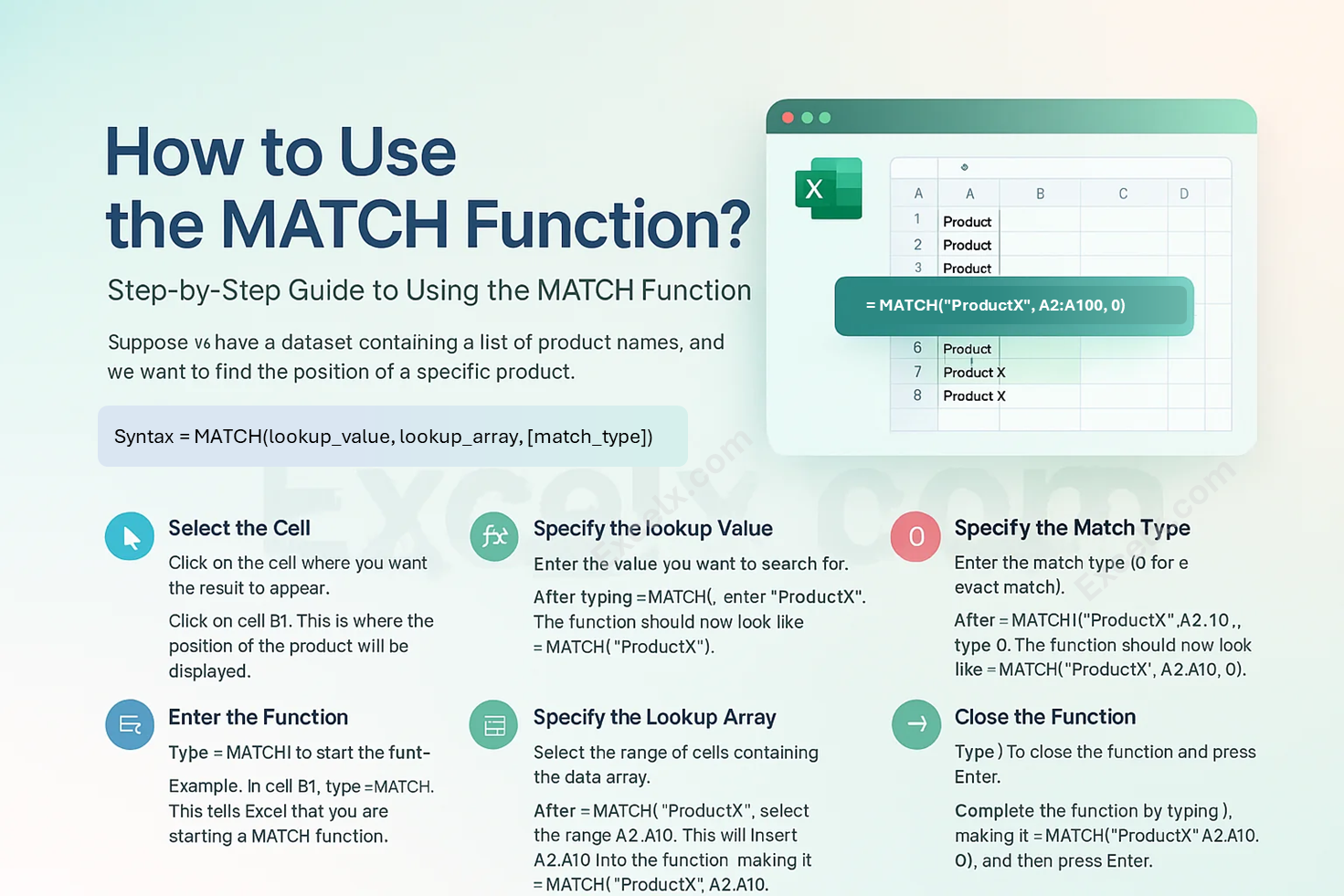
Match formula Excel can save you hours when you need to find something in a long list. Say you’ve got a sheet with hundreds of product IDs, and you need to know the position of a specific one. Instead of scrolling forever, you type in =MATCH(lookup_value, lookup_array, [match_type]), and Excel does the heavy lifting. It’s not just for numbers—it works with text, dates, and even wildcards if you set it up right.
It’s one of those formulas that feels like a secret weapon once you get the hang of it. Sure, XLOOKUP is flashier, but match formula Excel is faster for grabbing a position, not a value. Plus, it plays well with INDEX for more advanced lookups. If you’re still manually searching for data, this is your cue to stop.
Find positions, not just values
The match formula in Excel is all about locating where something sits in a list. It’s perfect for anyone who needs to map data between sheets or check if an item exists. Marketers use it to match campaign IDs to results, inventory managers track stock locations, and HR teams map employee IDs to departments.
Set up your sheet with two columns: one for your lookup list (e.g., product IDs) and one for the data you’re matching against (e.g., sales numbers). Keep the lookup list sorted if you’re using match_type 1 (exact or next smallest). Add a third column for the formula itself, and a fourth for any error handling with IFERROR.
| Product ID | Sales | Position | Formula |
|---|---|---|---|
| 101 | 250 | =MATCH(101, A2:A100, 0) |
|
| 102 | 300 | =MATCH(103, A2:A100, 1) |
|
| 103 | 150 | =MATCH("104", A2:A100, 0) |
The first formula returns 1 because 101 is the first item in the list. The second returns 5 since 103 isn’t there, but 105 is the next smallest. The third returns #N/A because "104" (as text) doesn’t match 104 (as a number).
Common mistake: Using match_type 1 on unsorted data. Excel won’t throw an error, but it’ll give you wrong results. Fix it by sorting the lookup array or switching to match_type 0 for exact matches.
Pair it with INDEX for dynamic lookups
The real power of match formula Excel comes when you combine it with INDEX. Together, they let you pull values from a table based on a lookup, without hard-coding cell references. This is how you build dynamic dashboards or reports that update automatically.
Create a table with Ctrl+T, then add a separate cell for your lookup value (e.g., "Q1 Sales"). Below it, set up a formula like =INDEX(table_array, MATCH(lookup_value, lookup_column, 0), return_column). Use IFERROR around it to catch missing data.
| Quarter | Region | Sales | Formula |
|---|---|---|---|
| Q1 | East | 500 | |
| Q1 | West | 700 | |
| Q2 | East | 600 |
Formula in D2: =IFERROR(INDEX(B2:B4, MATCH("Q1", A2:A4, 0), 2), "Not Found"). Returns 500 for Q1 East sales.
Common mistake: Forgetting to lock cell references with $. If you drag the formula down, A2:A4 should be $A$2:$A$4 to keep it anchored.
Handle errors and wildcards
Match formula in Excel breaks if it can’t find what you’re looking for. Wrap it in IFERROR to show a custom message instead of #N/A. If you’re working with partial matches, use wildcards by switching to match_type 0.
Add a data validation dropdown in your lookup cell to avoid typos. Go to Data > Data Validation > List, and point it to your lookup array. This keeps inputs consistent.
| Item | Price | Lookup | Result |
|---|---|---|---|
| Apple | 1.50 | p | 1 |
| Banana | 0.75 | n | 2 |
| Cherry | 2.00 | Peach | Not Found |
Formula in D2: =IFERROR(MATCH(C2 & "", A2:A4, 0), "Not Found"). For p, it returns 1 because "Apple" contains “p”.
Common mistake: Storing numbers as text. If your lookup value is 101 (number) but your array has "101" (text), the formula fails. Fix it with Data > Text to Columns > Finish to convert.
Build a lookup tracker
Turn match formula Excel into a reusable tracker by adding conditional formatting and filters. This works great for inventory logs, expense trackers, or project checklists. Highlight matches with Home > Conditional Formatting > New Rule > Use a formula.
Set up a filter on your lookup column (Ctrl+Shift+L) so you can narrow down results. Freeze the top row (View > Freeze Panes) if your sheet is long.
| Task ID | Status | Due Date | Priority |
|---|---|---|---|
| 001 | Done | 2023-10-15 | High |
| 002 | Pending | 2023-10-20 | Medium |
| 003 | Done | 2023-10-25 | Low |
Formula in E2: =IF(ISNUMBER(MATCH(A2, $A$2:$A$4, 0)), "Found", ""). Add conditional formatting to highlight “Found” cells.
Common mistake: Merging cells in your lookup array. Merged cells break formulas. Unmerge them with Home > Merge & Center > Unmerge Cells.
Try building a simple inventory tracker next. Use match formula Excel to flag low-stock items, and pair it with COUNTIFS to tally quantities.
Related: Bat Sizes Chart: A Clear Guide for Selection
A bat sizes chart is a handy tool for anyone looking to find the perfect bat size, and it's a great starting point for your sporting equipment journey. This guide will cover the basics, showing you how to read and use these charts effectively, whether you're a baseball or softball enthusiast.
These charts provide a quick reference, offering standard bat measurements and sizes, which can vary depending on your sport and age group. It's an easy way to ensure you're on the right track when choosing equipment, and we'll explore the key factors to consider.
Understanding Bat Sizes Chart
A bat sizes chart is a helpful tool for anyone looking to choose the right bat for their needs. It provides a visual guide to help you determine the ideal length and weight of a bat based on factors like age, height, and the sport you play. This chart is a great starting point, offering a quick reference to ensure you select a bat that suits your physical attributes and playing style.
Key Details and Categories
The bat sizes chart typically displays two main categories: length and weight. Length is usually measured in inches, with common sizes ranging from 24 to 34 inches. Weight is often shown in ounces, with a variety of options available. The chart may also include age and height recommendations to guide your selection. Remember, these charts are designed as a general guide, so it's important to consider individual preferences and playing experience.
How to Read and Apply the Chart
Using the bat sizes chart is straightforward. First, identify your age group or height range. Then, find the corresponding recommended length and weight ranges. For example, if you're an adult, the chart might suggest a longer and heavier bat, while youth players may need shorter and lighter options. It's essential to consider your comfort and swing speed when choosing. If you prefer a faster swing, a lighter bat might be best, even if the chart suggests a heavier one for your age.
Bat Size Variations and Differences
Bat sizes charts can vary depending on the sport and the standards used. For instance, baseball bat size charts and softball bat sizing guides may have different length and weight recommendations. Additionally, manufacturers might offer slightly different measurements or weight distributions. It's crucial to check the specific sport and brand guidelines to ensure you get the right bat for your needs. Regional variations also exist, with some countries using metric measurements, which can impact the chart's values.
Common Mistakes and How to Avoid Them
One common mistake is relying solely on the chart without considering personal preferences. Always try out a few bats to find the one that feels comfortable in your hands and allows for a smooth swing. Another pitfall is neglecting to check the latest standards and regulations, especially for competitive play. These can change over time, so it's essential to stay updated. Lastly, don't forget to measure your bat properly. Incorrect measurements can lead to an ill-fitting bat, affecting your performance. Always double-check your measurements against the chart's specifications.
Hey there, I hope this bat size chart has been helpful and easy to navigate. Remember, when it comes to choosing the right bat, it's all about finding the perfect fit for your game.
While this guide provides a solid foundation, it's always a good idea to double-check the specific requirements or regulations for your league or competition. Exact values can vary, so it's best to be prepared and ensure you're covered.
Feel free to explore more of our sports equipment guides and resources. We've got plenty of practical tips and insights to share, so stick around and discover more!
Related: What's the right window size chart for your needs?
A window size chart is a handy tool for anyone looking to understand window measurements quickly and easily. This guide will take you through the basics, covering what you need to know to read and use these charts effectively.
It's a simple reference, but one that can vary depending on your location and the type of window you're dealing with. Whether you're after standard window dimensions or more specific measurements, a good chart will provide a clear overview, helping you choose the right size for your needs.
Understanding Window Size Charts
A window size chart is a valuable tool for anyone planning a construction or renovation project. It provides a quick reference guide to standard window dimensions, helping you choose the right size and type for your space. These charts are a handy way to visualize and compare options, ensuring your windows fit the intended space and serve their purpose.
Key Details and Categories
Before diving into a window size chart, it's essential to understand the basic units and categories. Most charts use inches for width and height, with standard sizes ranging from 18" x 18" to 36" x 72". These dimensions cover a wide range of common window types, including single-hung, double-hung, casement, and fixed windows. The charts often include a breakdown of these categories, making it easy to identify the right type for your needs.
Reading the Chart: A Step-by-Step Guide
- Identify the window type you require. This could be a double-hung window for ease of use or a casement window for ventilation.
- Locate the relevant section on the chart. Each type will have its own set of standard sizes.
- Choose the size that best fits your space. Consider the width and height of the opening and ensure the window provides adequate coverage.
- Note the dimensions and any additional details, such as the number of panes or the window's energy efficiency rating.
- Cross-reference with other charts or guidelines to ensure accuracy, especially if you're working with non-standard sizes or unique architectural features.
Variations and Differences
Window size charts can vary depending on the standard being used. While most follow a similar format, there may be slight differences in dimensions or the inclusion of specific window types. For instance, some charts might cater to a wider range of window styles, including awning or bay windows. It's crucial to refer to the right chart for your region or project requirements. Additionally, manufacturers may have their own charts with slight variations to accommodate their product range.
Common Mistakes and How to Avoid Them
One of the most common mistakes is assuming that all windows are created equal. Different window types have unique purposes and may not fit the same space. Always refer to the correct chart for the window style you need. Another pitfall is neglecting to consider the frame size. The window size chart typically refers to the glass dimensions, so ensure you account for the frame when measuring your space. Finally, don't forget to check for any local building regulations or guidelines that might impact your window choices.
Well, there you have it! A window size chart is a handy tool to keep in your back pocket. It's a simple reference guide, but one that can save you time and ensure accuracy when planning your next project.
Remember, while this chart provides a great starting point, it's always wise to double-check the specific requirements for your unique situation. Exact values can vary, so it's best to be prepared and avoid any potential pitfalls. So, bookmark this page, and you'll have a quick and easy solution whenever you need it.