



Calendar Template For January 2026 Overview
Match formula Excel can save you hours when you need to find something in a long list. Say you’ve got a sheet with hundreds of product IDs, and you need to know the position of a specific one. Instead of scrolling forever, you type in =MATCH(lookup_value, lookup_array, [match_type]), and Excel does the heavy lifting. It’s not just for numbers—it works with text, dates, and even wildcards if you set it up right.
It’s one of those formulas that feels like a secret weapon once you get the hang of it. Sure, XLOOKUP is flashier, but match formula Excel is faster for grabbing a position, not a value. Plus, it plays well with INDEX for more advanced lookups. If you’re still manually searching for data, this is your cue to stop.
Find positions, not just values
The match formula in Excel is all about locating where something sits in a list. It’s perfect for anyone who needs to map data between sheets or check if an item exists. Marketers use it to match campaign IDs to results, inventory managers track stock locations, and HR teams map employee IDs to departments.
Set up your sheet with two columns: one for your lookup list (e.g., product IDs) and one for the data you’re matching against (e.g., sales numbers). Keep the lookup list sorted if you’re using match_type 1 (exact or next smallest). Add a third column for the formula itself, and a fourth for any error handling with IFERROR.
| Product ID | Sales | Position | Formula |
|---|---|---|---|
| 101 | 250 | =MATCH(101, A2:A100, 0) |
|
| 102 | 300 | =MATCH(103, A2:A100, 1) |
|
| 103 | 150 | =MATCH("104", A2:A100, 0) |
The first formula returns 1 because 101 is the first item in the list. The second returns 5 since 103 isn’t there, but 105 is the next smallest. The third returns #N/A because "104" (as text) doesn’t match 104 (as a number).
Common mistake: Using match_type 1 on unsorted data. Excel won’t throw an error, but it’ll give you wrong results. Fix it by sorting the lookup array or switching to match_type 0 for exact matches.
Pair it with INDEX for dynamic lookups
The real power of match formula Excel comes when you combine it with INDEX. Together, they let you pull values from a table based on a lookup, without hard-coding cell references. This is how you build dynamic dashboards or reports that update automatically.
Create a table with Ctrl+T, then add a separate cell for your lookup value (e.g., "Q1 Sales"). Below it, set up a formula like =INDEX(table_array, MATCH(lookup_value, lookup_column, 0), return_column). Use IFERROR around it to catch missing data.
| Quarter | Region | Sales | Formula |
|---|---|---|---|
| Q1 | East | 500 | |
| Q1 | West | 700 | |
| Q2 | East | 600 |
Formula in D2: =IFERROR(INDEX(B2:B4, MATCH("Q1", A2:A4, 0), 2), "Not Found"). Returns 500 for Q1 East sales.
Common mistake: Forgetting to lock cell references with $. If you drag the formula down, A2:A4 should be $A$2:$A$4 to keep it anchored.
Handle errors and wildcards
Match formula in Excel breaks if it can’t find what you’re looking for. Wrap it in IFERROR to show a custom message instead of #N/A. If you’re working with partial matches, use wildcards by switching to match_type 0.
Add a data validation dropdown in your lookup cell to avoid typos. Go to Data > Data Validation > List, and point it to your lookup array. This keeps inputs consistent.
| Item | Price | Lookup | Result |
|---|---|---|---|
| Apple | 1.50 | p | 1 |
| Banana | 0.75 | n | 2 |
| Cherry | 2.00 | Peach | Not Found |
Formula in D2: =IFERROR(MATCH(C2 & "", A2:A4, 0), "Not Found"). For p, it returns 1 because "Apple" contains “p”.
Common mistake: Storing numbers as text. If your lookup value is 101 (number) but your array has "101" (text), the formula fails. Fix it with Data > Text to Columns > Finish to convert.
Build a lookup tracker
Turn match formula Excel into a reusable tracker by adding conditional formatting and filters. This works great for inventory logs, expense trackers, or project checklists. Highlight matches with Home > Conditional Formatting > New Rule > Use a formula.
Set up a filter on your lookup column (Ctrl+Shift+L) so you can narrow down results. Freeze the top row (View > Freeze Panes) if your sheet is long.
| Task ID | Status | Due Date | Priority |
|---|---|---|---|
| 001 | Done | 2023-10-15 | High |
| 002 | Pending | 2023-10-20 | Medium |
| 003 | Done | 2023-10-25 | Low |
Formula in E2: =IF(ISNUMBER(MATCH(A2, $A$2:$A$4, 0)), "Found", ""). Add conditional formatting to highlight “Found” cells.
Common mistake: Merging cells in your lookup array. Merged cells break formulas. Unmerge them with Home > Merge & Center > Unmerge Cells.
Try building a simple inventory tracker next. Use match formula Excel to flag low-stock items, and pair it with COUNTIFS to tally quantities.
Related: outlook unsend email Simple Excel tracker for recall
The Art of Budgeting: Mastering Your Finances
Understanding the Basics of Budgeting
Budgeting is the foundation of financial health. It involves tracking income, categorizing expenses, and allocating funds to meet both short-term needs and long-term goals. A well-structured budget ensures you live within your means, save consistently, and avoid debt. The core principle is simple: spend less than you earn. However, the execution requires discipline and a clear plan.
Start by listing all sources of income, including salary, side gigs, or investments. Next, categorize expenses into fixed (rent, utilities) and variable (groceries, entertainment). Use tools like spreadsheets, apps, or notebooks to track spending. The 50/30/20 rule is a popular framework: 50% for needs, 30% for wants, and 20% for savings and debt repayment.
Creating a Realistic Budget Plan
A realistic budget aligns with your lifestyle and financial goals. Begin by analyzing past spending to identify patterns. For instance, if you spend $400 monthly on dining out, allocate that amount but consider reducing it gradually. Prioritize essentials like housing and food before discretionary spending.
Worked Example:
Imagine your monthly income is $4,000. Using the 50/30/20 rule:
- Needs (50%): $2,000 (e.g., $1,200 rent, $300 utilities, $500 groceries).
- Wants (30%): $1,200 (e.g., $400 dining, $300 entertainment, $500 shopping).
- Savings/Debt (20%): $800 (e.g., $500 emergency fund, $300 student loan).
Adjust categories based on your priorities. For example, if you’re saving for a house, reduce wants and increase savings.
Common Mistake: Overestimating Income or Underestimating Expenses
A frequent error is assuming consistent income or overlooking irregular expenses. For instance, freelancers might base their budget on a high-income month, only to struggle during slower periods. Similarly, forgetting annual expenses like insurance premiums can derail your plan.
Fix: Use your lowest consistent income as the baseline. For irregular expenses, divide the annual cost by 12 and set aside that amount monthly. Example: A $600 annual car insurance policy requires saving $50 monthly.
Tracking and Adjusting Your Budget
Budgeting isn’t a set-it-and-forget-it task. Regularly monitor your spending to ensure you stay on track. Weekly check-ins help catch overspending early. If you consistently exceed a category, reassess its allocation or cut back in another area.
Tools for Effective Budgeting
Leverage technology to simplify budgeting. Apps like Mint, YNAB, or Excel templates automate tracking and provide insights. For manual tracking, a notebook or bullet journal works well. The key is consistency—choose a method that fits your lifestyle.
Budgeting for Irregular Income
If your income varies, budgeting requires extra planning. Calculate your average monthly income over the past year and use that as your baseline. Allocate funds to a savings buffer during high-income months to cover lows.
Example:
If your monthly income ranges from $2,500 to $4,500, average it to $3,500. Save the surplus during high-income months in a separate account.
Common Mistake: Neglecting Emergency Funds
Many budgets focus on daily expenses but ignore emergencies. Without a safety net, unexpected costs like car repairs can lead to debt.
Fix: Prioritize building an emergency fund covering 3-6 months of living expenses. Start small—even $20 weekly adds up over time.
Budgeting for Long-Term Goals
Incorporate long-term goals like retirement, homeownership, or education into your budget. Use retirement accounts (e.g., 401(k), IRA) and high-yield savings for specific goals.
Example:
To save $20,000 for a down payment in 5 years, allocate $333 monthly. Adjust for interest or investment returns if applicable.
Dealing with Debt in Your Budget
Debt repayment should be a priority. Use the debt snowball (pay smallest debts first) or avalanche (pay highest-interest debts first) method. Allocate at least the minimum payments in your budget, with extra funds toward high-interest debt.
Common Mistake: Ignoring Small Expenses
Daily coffee or subscription services can add up quickly. These small expenses often go unnoticed but significantly impact your budget.
Fix: Track every expense, no matter how small. Cut non-essential subscriptions and limit impulse purchases.
Budgeting as a Family
Family budgeting requires collaboration. Hold regular financial meetings to discuss goals and progress. Teach children about money management by involving them in budgeting decisions.
Example:
Allocate $100 monthly for family outings and let kids decide how to spend it within that limit.
Adapting Your Budget Over Time
Life changes—new jobs, marriages, or children—require budget adjustments. Review your budget quarterly to reflect new circumstances.
Common Mistake: Being Too Rigid
A budget that’s too restrictive leads to frustration and abandonment. Allow flexibility for occasional treats or unexpected needs.
Fix: Include a "miscellaneous" category for unplanned expenses or occasional indulgences.
The Psychological Aspect of Budgeting
Budgeting isn’t just about numbers; it’s about mindset. Celebrate small wins, like paying off a credit card, to stay motivated. View budgeting as a tool for freedom, not restriction.
Example:
Reward yourself with a movie night after sticking to your budget for three months.
Budgeting for Special Occasions
Plan for holidays, birthdays, or vacations in advance. Set aside a small amount monthly to avoid financial stress during these events.
Example:
For a $1,000 holiday budget, save $83 monthly starting in January.
Common Mistake: Relying on Credit for Budget Shortfalls
Using credit cards to cover budget gaps leads to debt accumulation. Interest charges compound the problem, making repayment harder.
Fix: Reduce expenses or increase income to cover shortfalls. If necessary, use a 0% interest credit card temporarily but pay it off before the promotional period ends.
Budgeting for Retirement
Start early to maximize retirement savings. Contribute to employer-matched plans and explore tax-advantaged accounts like Roth IRAs.
Example:
If your employer matches 5% of your salary, contribute at least that amount to get the full benefit.
Final Thoughts on Budgeting
Budgeting is a dynamic process that evolves with your life. Stay committed, be flexible, and focus on progress, not perfection. With time, it becomes second nature, paving the way for financial security and peace of mind.
Related: RSMeans Estimating Essential Guide For Builders
RSMeans estimating... it's a term I've come across recently, and I was curious to know more. As someone who's dabbled in home renovations and heard about construction projects, I wanted to understand what this phrase means and how it relates to the world of building and remodeling. So, let's dive in and uncover the secrets behind RSMeans estimating!
Unraveling the Mystery: What is RSMeans Estimating?
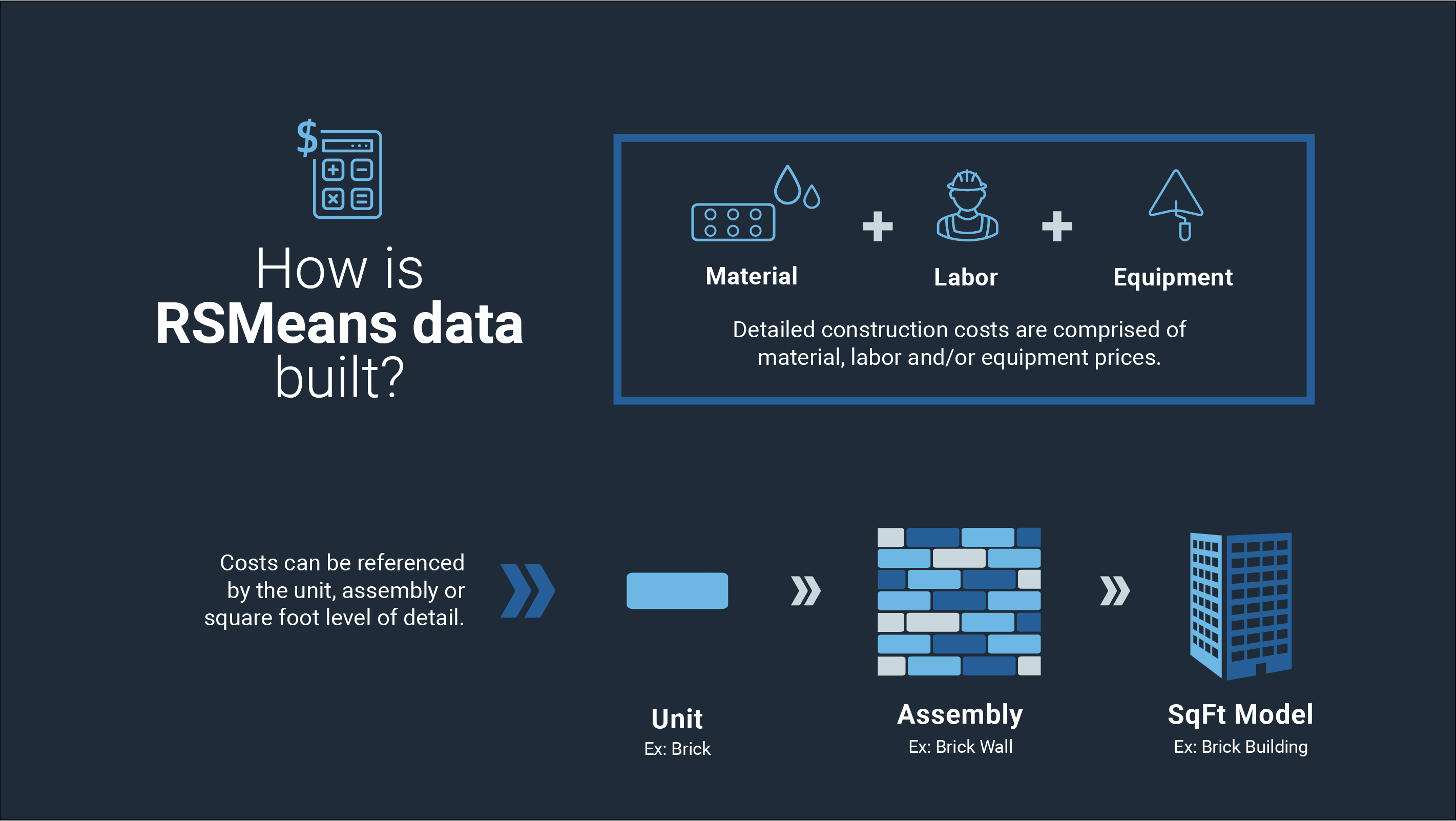
RSMeans estimating is a tool, a resource, and a method used by construction professionals to estimate the costs and pricing of various projects. It's like a handy guide that helps builders, contractors, and even homeowners like me make informed decisions. This estimating process considers factors like labor, materials, and the overall scope of the work to provide an accurate cost estimate.
For those of us considering a home renovation, understanding RSMeans estimating can be a game-changer. It empowers us to compare quotes, ensure we're getting a fair deal, and make smart choices about our projects. Whether it's a bathroom renovation or a full-scale house addition, having a reliable estimate is crucial.
Hiring the Right Contractor: A Guide
When it comes to hiring a contractor for your project, RSMeans estimating can be a valuable tool. It helps you evaluate quotes and understand the breakdown of costs. Here's a simple guide:
- Check the contractor's experience and reputation.
- Ask for references and read reviews.
- Get multiple quotes and compare them.
- Ensure the quote covers all aspects of the job.
- Look for transparency and clear communication.
A good quote should detail the work, materials, and labor costs. It should also include any potential additional expenses, like permits or unexpected issues. Remember, it's not just about the lowest price; it's about finding a reliable and skilled contractor who understands your vision.
Construction Business Names: A Creative Challenge
Naming a construction business is an art! It's a chance to be creative and leave a lasting impression. A great name should be memorable, reflect your company's values, and stand out in a competitive market. Here are a few ideas:
- BuildCraft
- HomeWorkz
- SkyRise Solutions
- EarthMovers
- Brick & Mortar Pros
- BuildTech Innovations
Before settling on a name, check its availability for domains and local registration. You want to ensure your business name is unique and can be easily found online.
The World of Construction Jobs
The construction industry offers a wide range of roles, from estimators to project managers and skilled laborers. Estimator jobs, for instance, involve using tools like RSMeans to calculate costs accurately. These professionals are in demand and play a crucial role in the success of projects.
If you're interested in construction jobs, explore online job boards, local newspapers, and industry-specific websites. Many construction companies also advertise directly on their websites, so it's worth keeping an eye out for openings.
RSMeans: A Powerful Tool for Professionals
RSMeans is a trusted resource in the construction industry. It provides cost databases, escalation data, and cost indexes, helping professionals make informed decisions. Whether you're a general contractor or a remodeling company, RSMeans estimating offers valuable insights.
This tool is especially useful when planning projects, as it helps anticipate costs and stay within budget. It's a go-to resource for many in the industry, providing accurate and up-to-date information.
Big vs. Small: The Construction Industry Landscape
The construction industry is diverse, with both large corporations and small, local businesses. Large firms often have the resources to take on major projects and offer a wide range of services. They may have a broader reach and access to more specialized skills.
Small businesses, on the other hand, can provide a more personalized experience. They often have a strong local presence and can offer competitive pricing. When choosing a company, consider your project's scope and your preferences for size and expertise.
In conclusion, RSMeans estimating is a valuable tool for anyone involved in construction, remodeling, or building projects. It empowers us to make informed decisions, compare costs, and ensure a successful outcome. So, whether you're in Atlanta, Baltimore, or San Francisco, RSMeans estimating is a resource worth exploring!