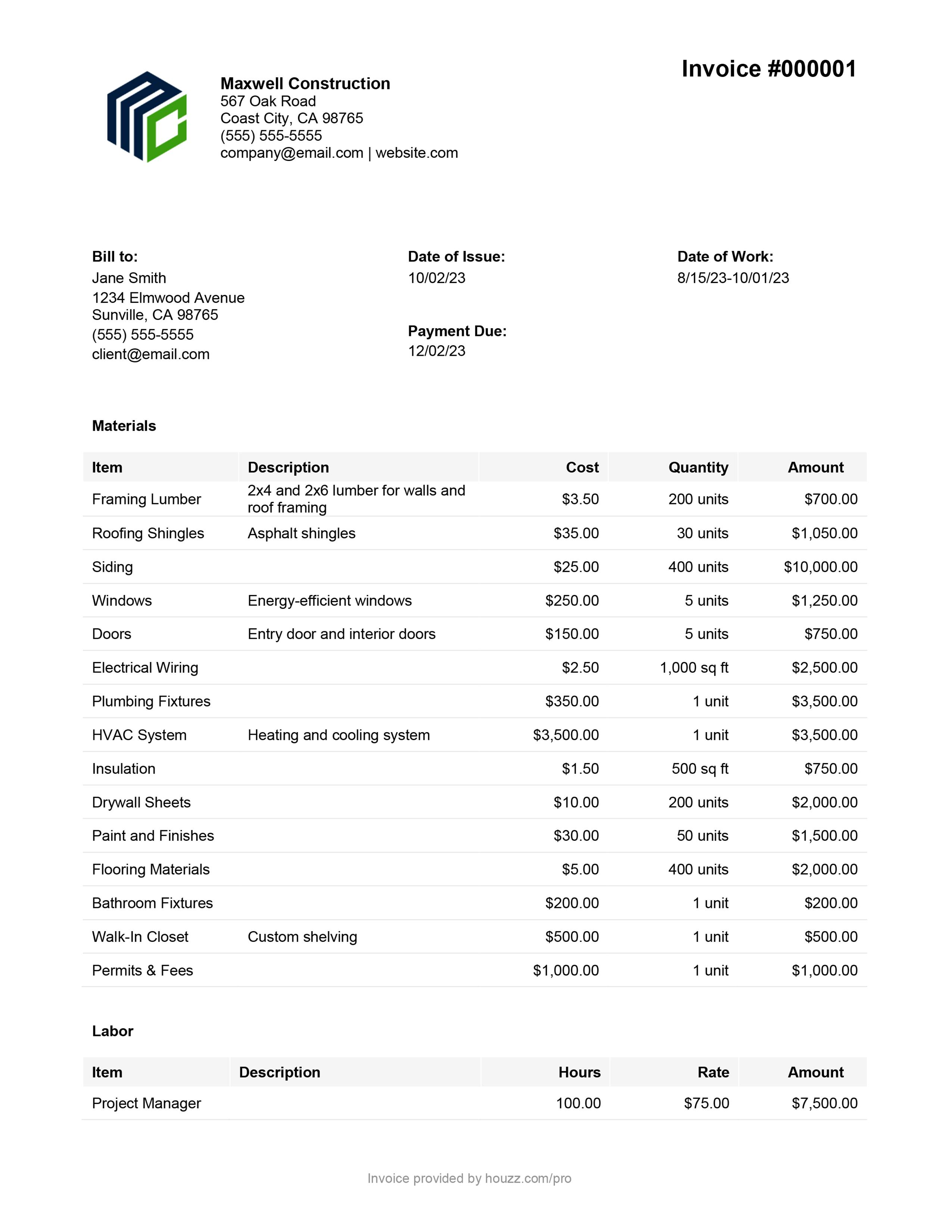










Contractor For House Repair Template Overview
"Hmm, I need to find a good general contractor for my home renovation. Any ideas on where to start?"
Understanding General Contractor Names
When you're planning a construction project, whether it's a new build or a renovation, one of the first steps is finding the right general contractor. General contractor names can be a bit of a mystery, but it's an important part of the process. These names are like a window into the company's identity and can give you a sense of their expertise and reputation.
So, how do you go about finding and choosing the right one? Well, it's not just about the name, but what it represents. A good general contractor will have a solid team, the right skills, and a track record of successful projects.
Choosing the Right Contractor
When you're searching for a general contractor, it's essential to do your research. Look for companies with a strong online presence and read reviews from previous clients. Check their portfolio to see if they've worked on similar projects to yours. You want to ensure they have the necessary experience and can handle the scope of your job.
Ask for references and contact previous clients to get an honest opinion on the contractor's work. It's also a good idea to meet with the contractor in person to discuss your project and get a feel for their communication style and approach.
Pricing and Quotes
One of the biggest concerns when hiring a general contractor is the cost. Pricing can vary greatly depending on the scope of the project, materials, and labor costs. It's crucial to get several written quotes to compare and ensure you're getting a fair deal.
When comparing quotes, look beyond the bottom line. Consider what's included in the price, the timeline, and any potential hidden costs. A detailed, itemized quote is often a good indicator of a professional and transparent contractor.
Naming Your Construction Business
If you're in the construction business, choosing a name for your company is a big decision. It's your brand and can impact how potential clients perceive you. A good name should be memorable, unique, and reflect your company's values and services.
Here are a few name ideas to get you started:
- BuildCraft
- HomeRemodel Pros
- Constructive Solutions
- Renova
- The Build Team
- Crafted Spaces
Remember, before settling on a name, check its availability for domains and local registration to avoid any legal issues down the line.
Industry Tools and Data
In the construction industry, tools like RSMeans can be valuable resources. RSMeans provides cost data and estimating tools, helping contractors and clients understand the financial aspects of a project. It's a great way to ensure accurate pricing and manage expectations.
The Construction Industry
The construction industry is diverse, with companies of all sizes. Larger firms often have the resources to take on bigger projects and may specialize in certain areas. Smaller companies can offer a more personalized service and may be more flexible with pricing.
Wrapping Up
Finding the right general contractor is a crucial step in any construction project. It's all about research, comparing quotes, and understanding what you want and need. Remember, the name is just the beginning; it's the company's reputation and expertise that truly matter.
So, take your time, do your due diligence, and you'll be on your way to a successful construction project. Good luck!
Related: How to Read a BBT Chart for Pregnancy
A bbt chart pregnant is a simple yet powerful tool for anyone on a pregnancy journey. This guide will show you how to make the most of it.
The chart is a handy reference for tracking your basal body temperature, which can indicate ovulation and help with pregnancy planning. It's a straightforward way to interpret your body's signals, and while the values may vary slightly, the concept is universal. With a bbt chart pregnant, you can gain insights into your cycle and take control of your fertility awareness.
A Quick Overview of BBT Charting for Pregnancy
The basal body temperature (BBT) chart is a simple yet powerful tool for those trying to conceive. It helps track your fertility awareness and can indicate when you're most likely to get pregnant. This chart records your body's temperature, which rises slightly after ovulation, providing valuable insights into your ovulation tracking.
Comparing BBT Charting Methods and Standards
There are various ways to create a BBT chart pregnant record. You can use a simple pen and paper, a dedicated fertility tracking app, or a specialized BBT thermometer with accompanying software. The method you choose depends on your personal preference and the level of detail you wish to record.
Step-by-Step Guide to Using a BBT Chart
Here's a simple process to get started with BBT charting:
Choose your preferred method of recording (paper, app, or software).
Take your basal body temperature first thing in the morning, before getting out of bed or doing any physical activity. Use a reliable BBT thermometer, which is more sensitive than a regular thermometer.
Record the temperature accurately. Most BBT thermometers have a memory function to store the reading, but if you're using a manual method, write it down immediately to avoid forgetting.
Plot the temperature on your chart or enter it into your app/software. Connect the dots to visualize the temperature pattern over time.
Look for the temperature shift. After ovulation, your BBT typically rises by 0.4 to 1.0 degrees Fahrenheit (or 0.2 to 0.5 degrees Celsius). This shift indicates that ovulation has likely occurred.
Common Misreadings and How to Avoid Them
It's easy to misinterpret the data on a BBT chart pregnant. Here are some common mistakes and how to avoid them:
Don't rely solely on the temperature rise to confirm ovulation. Other factors, like stress or illness, can cause temperature fluctuations. Look for a sustained rise for at least three days to confirm ovulation.
Be consistent with your timing. Always take your temperature at the same time each morning, preferably within a one-hour window.
Avoid drinking or eating before taking your temperature, as this can affect the reading.
If you have an irregular cycle, consider using additional ovulation tracking methods, like cervical mucus observation or ovulation predictor kits, to cross-reference your BBT chart.
Factors Affecting BBT Chart Accuracy
Several factors can impact the accuracy of your BBT chart pregnant:
Sleep quality and duration: Ensure you get a good night's rest and try to maintain a consistent sleep schedule.
External factors: Keep the thermometer in the same room each night to avoid temperature variations. Avoid using an electric blanket, as this can raise your body temperature.
Illness or medication: If you're unwell or taking certain medications, your temperature may be affected. Note these instances on your chart to avoid misinterpretation.
Stress and lifestyle: High-stress levels or intense physical activity can impact your BBT. Try to maintain a balanced lifestyle and manage stress through relaxation techniques.
Adapting Your BBT Chart for Specific Needs
While the basic principles of a BBT chart pregnant remain the same, you may need to adapt it for your unique circumstances:
If you have an irregular cycle, consider using a longer chart to capture more data points and identify patterns.
For those with shorter cycles, a condensed chart may be more suitable to visualize the temperature shifts.
If you're using fertility awareness methods for birth control, consult with a healthcare professional to ensure you're interpreting the chart correctly to avoid unintended pregnancies.
So, there you have it! A simple yet powerful tool to guide you through your pregnancy journey. Remember, every woman's experience is unique, so always refer to reliable sources and consult professionals for personalized advice.
This chart is a handy reference, but it's just a starting point. Be sure to adapt and customize it to your specific needs and circumstances. Bookmark this page for future use, and you'll always have a quick reminder of the basics when you need it!
Related: remove duplicates excel Easy guide for clean data
Ugh, duplicates in Excel. We've all been there, staring at a massive spreadsheet with rows and rows of data, only to realize there are multiple entries for the same thing. Remove duplicates Excel to the rescue! Let's get into how this handy feature works and why it's a lifesaver for anyone dealing with data.
So, you've got your Excel sheet open, and it's a mess of similar entries. Maybe it's a list of contacts, products, or sales data, and you need to clean it up. The "Remove Duplicates" feature is like a magic wand, but it's not as simple as clicking a button. You've got to set it up right to get the results you need.
First, let's talk about how Excel identifies duplicates. It looks at the values in the cells and compares them. But here's the catch: by default, it only checks the active column. So, if you have duplicate entries across multiple columns, you need to tell Excel which columns to consider. You do this by selecting the range of cells you want to check, then heading to the "Data" tab and clicking "Remove Duplicates." A pop-up will appear, showing you the columns Excel will check. Make sure to select all the relevant columns, and voila! You're on your way to a cleaner sheet.
Setting it Up: A Step-by-Step Guide
Now, let's get into the nitty-gritty. After selecting your range, click "Remove Duplicates," and that pop-up will appear. Here, you can choose which columns to check. But be careful! If you have multiple columns with similar data, Excel might remove entries you want to keep. For example, if you have a contact list with names and email addresses, and someone has the same name but a different email, Excel might see it as a duplicate and remove one entry. To avoid this, you can use a formula like =IF(ISERROR(MATCH(B2,$B$2:$B$100,0)),"","Duplicate") in a helper column. This formula checks if the email address in column B is a duplicate within the range B2 to B100. If it is, it returns "Duplicate"; otherwise, it leaves the cell blank. This way, you can easily identify and keep the entries you need.
Another tip: before removing duplicates, consider using conditional formatting to highlight potential duplicates. This way, you can visually inspect the data and make sure you're not losing important entries. Excel's "Conditional Formatting" feature lets you format cells based on their values, so you can quickly spot and address any issues.
Keeping Your Data Clean
Maintaining a tidy spreadsheet is crucial, and remove duplicates Excel is just one tool in your belt. Regularly review and clean your data to avoid messy formatting and broken cells. Use Excel's built-in tools like SUMIFS for quick calculations and XLOOKUP for finding specific values. These formulas, along with drop-down lists and other features, can keep your sheet organized and efficient.
In a nutshell, remove duplicates Excel is a powerful feature, but it's just one part of the Excel toolkit. With a bit of practice and these tips, you'll be a pro at managing your data and keeping your spreadsheets shipshape. So, next time you open that massive contact list, remember these tricks and tackle those duplicates like a boss!