



Excel Vat Invoice Template Overview
"Wow, this house is looking a little tired. I'd love to give it a fresh, custom home renovation, but where do I start?"
All About Custom Home Renovations
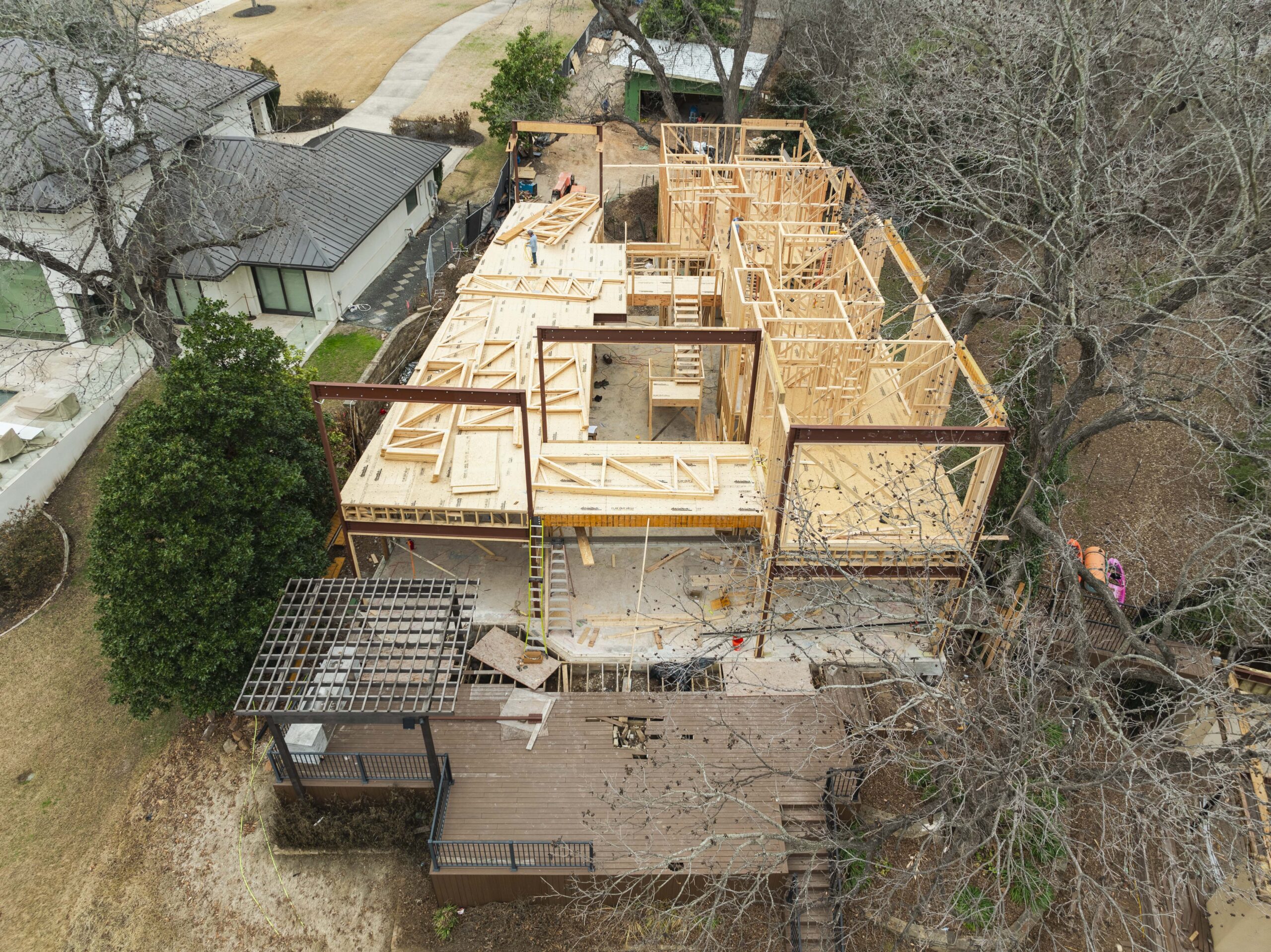
Custom home renovations are all about transforming your living space to fit your unique needs and style. It's a big project, but the results can be amazing! Whether you're looking to modernize an old home, add an extension, or completely redesign a room, renovations offer a chance to create something truly special.
The process involves a few key steps. First, you'll need to plan and design your renovation. This is where you decide on the scope of work, choose materials and finishes, and create a budget. It's important to be clear on your vision and communicate this to your chosen contractor or builder.
Finding the Right Contractor
Hiring a contractor is a crucial step. You'll want to find a reliable, experienced professional who understands your vision. Check their qualifications, ask for references, and ensure they're licensed and insured. Get multiple quotes and compare them based on cost, timeline, and the level of detail provided. A good quote should cover all aspects of the job, including materials, labor, and any potential extra costs.
Costs and Budgeting
The cost of custom home renovations can vary widely. It depends on factors like the size and complexity of the project, the materials used, and labor costs in your area. To keep costs down, consider doing some of the simpler tasks yourself, like painting or basic plumbing. But for more complex work, it's best to hire professionals to ensure a safe and high-quality job. Always get written quotes and compare them to stay within your budget.
Construction and Project Management
Once you've hired a contractor, the construction phase begins. This is where the magic happens! Your contractor will manage the project, coordinate with subcontractors, and ensure the work is completed to a high standard. They'll also handle any necessary permits and inspections. It's important to stay in touch with your contractor during this phase to discuss any changes or concerns.
Company Names and Branding
If you're in the construction business, choosing a company name is key. A good name should be memorable, unique, and reflect your brand. It should also be easy to search for online. Here are a few ideas:
- Build-It-Right
- Home Transformations
- Custom Creations
- Modern Renovations
Remember to check name availability and secure your domain and local registration.
Industry Tools and Data
In the construction industry, tools like RSMeans provide valuable cost estimating data. These resources help contractors and estimators price jobs accurately. They consider factors like labor rates, material costs, and local market conditions. It's a great way to ensure fair pricing and stay competitive.
Construction Jobs and Salaries
The construction industry offers a range of roles, from general contractors to specialized tradespeople. Salaries vary depending on experience, qualifications, and the type of work. Estimators, for example, play a crucial role in pricing projects accurately. They use tools like cost databases and escalation indexes to provide accurate quotes.
Large vs. Small Companies
The construction industry has a mix of large and small companies. Large firms often have more resources and can take on bigger projects, but they may be less flexible. Smaller companies can offer more personalized service and may be better suited to smaller, custom jobs. It's a matter of finding the right fit for your project.
So, if you're thinking of a custom home renovation, take the time to plan, research, and find the right team. It's an exciting process that can transform your home and create a space you'll love.
Related: Home Renovation Services Essential Guide
Home renovation services can be a daunting prospect for many homeowners, but it's a necessary step for those wanting to upgrade their living space. Whether it's a bathroom remodel or an entire house addition, these services offer a way to transform your home into your dream space. So, let's break down what home renovation services entail and how to navigate this process effectively.
Understanding the Basics
Home renovation services cover a wide range of construction and remodeling projects. From simple installations like new kitchen cabinets to complex structural changes, these services cater to various needs. It's important to know that the cost of renovations can vary greatly depending on the scope of work. Factors like the size of the project, the materials used, and the labor required all influence the final price. When comparing quotes, ensure you're getting an accurate assessment of the work needed and the associated costs.
Hiring the Right Team
Finding the right contractor or company is crucial for a successful renovation. Research and recommendations are key here. Check online reviews, ask for references from past clients, and ensure the company is licensed and insured. When requesting quotes, be specific about your project and ask detailed questions about their process, timeline, and any potential challenges. A good quote should provide a clear breakdown of costs and a realistic timeline.
Company Names and Branding
For those in the construction business, choosing a name is an important step. A good name should be memorable, reflect the nature of your work, and be unique. It's a balance between creativity and practicality. Some example names could be:
- Build & Bloom
- Home Revampers
- Crafted Spaces
- Renovo
- Constructive Solutions
- Creative Renovations
Remember to check the availability of these names and secure the relevant domains and local registrations.
Jobs and Opportunities
The home renovation services industry offers a range of job roles, from general contractors to specialized estimators. These roles often involve managing projects, coordinating with clients, and ensuring the smooth execution of renovations. Many construction jobs are advertised through online job boards and local classifieds. It's a competitive field, so highlighting your skills and experience is key when applying.
Industry Tools and Data
Tools like RSMeans provide valuable data for the construction industry. These databases offer cost information, helping contractors and businesses estimate project expenses accurately. They also provide insights into labor and material costs, which can be useful for budgeting and planning.
Large vs. Small Firms
The home renovation services industry caters to various scales of operations. Large firms often have the resources to take on extensive projects and may offer a wider range of services. They might have specialized teams for different aspects of construction. On the other hand, smaller firms can provide a more personalized approach, often with a focus on local projects.
Final Thoughts
Home renovation services can be a rewarding investment, but it's important to do your research and plan effectively. From choosing the right team to understanding the costs, each step is crucial. Remember, a well-planned renovation can transform your home and enhance your living experience. So, take the time to explore your options and create a space you'll love coming home to.
Related: Create a Sankey Chart in Excel: A Simple Guide
A common misconception about sankey chart excel is that it's solely for engineers or data experts. But, in reality, anyone can benefit from understanding these visual gems!
Sankey diagrams offer a simple yet powerful way to visualize flows and processes. Whether tracking energy, materials, or any other data, they provide an at-a-glance overview, making complex information accessible. So, if you've been avoiding sankey chart excel, it's time to give it a go! You might just discover a new favorite tool.
Understanding the Flow: Sankey Chart Excel
Sankey charts are a powerful tool to visualize the flow of data, often used to show energy or material balances in a process. These charts are a great way to understand complex systems and their components. In this guide, we'll explore how to read and create Sankey charts in Excel, making data analysis a breeze!
Comparing Chart Options: Sankey vs. Other Visualizations
When it comes to data visualization, Sankey charts offer a unique perspective. Unlike bar charts or line graphs, Sankey diagrams focus on the flow and connection between categories. They are ideal for showing how one category contributes to another, making them perfect for energy flow analyses or tracking material usage.
Creating a Sankey: A Step-by-Step Guide
To create a Sankey chart in Excel, follow these simple steps:
Gather your data: Ensure you have a clear understanding of the categories and their relationships. Organize your data in a structured way, with columns representing the flow sources and targets.
Prepare your data: Clean and format your data to ensure accuracy. Convert any necessary units and ensure consistent formatting. Excel's data validation tools can help with this process.
Insert the Sankey chart: Go to the 'Insert' tab in Excel and select 'Recommended Charts'. Choose the 'All Charts' tab, and under the 'Hierarchy' section, select 'Sankey'. Excel will suggest a layout based on your data.
Customize and refine: Adjust the chart's appearance to your liking. Change colors, add labels, and format the text to enhance readability. You can also adjust the width of the flow arrows to emphasize important data points.
Interpret the results: Analyze the chart to understand the flow patterns. Look for areas where the flow is concentrated or where there are significant drops or increases. This visualization will help identify key trends and areas of interest.
Common Misreadings and Pitfalls
While Sankey charts are powerful, they can be misinterpreted if not read correctly. Here are some common mistakes to avoid:
Misinterpreting arrow width: The width of the arrows represents the flow magnitude. Wider arrows indicate a larger flow, but this can be misleading if the scale is not considered. Always check the legend or scale to understand the actual values.
Ignoring labels: Sankey charts often have labels along the arrows, providing additional context. These labels can indicate the specific category or the flow rate. Ensure you read and understand these labels to gain a comprehensive understanding.
Overlooking data ranges: Sankey charts may not always represent the full range of values. If the chart only shows a subset of data, ensure you understand the boundaries and consider the complete dataset for accurate analysis.
Key Factors Affecting Accuracy
To ensure accurate Sankey charts, consider these critical factors:
Data integrity: Ensure your data is accurate and up-to-date. Any errors or inconsistencies can lead to misleading visualizations.
Standard units: Always use consistent units throughout your data. Mixing units can result in incorrect flow representations.
Scale and range: Understand the scale and range of your data. Sankey charts may not always show the full range, so consider the boundaries and potential outliers.
Data normalization: If your data has vastly different scales, consider normalizing it to ensure an accurate representation. This step is crucial when comparing flows of varying magnitudes.
Adapting the Format: Real-World Applications
Sankey charts excel in various real-world applications. Here are some ways to adapt the format for specific needs:
Energy audits: Visualize energy flows in a building or industrial process to identify inefficiencies and optimize energy usage.
Material tracking: Track the flow of materials in a supply chain, helping to identify bottlenecks and optimize resource allocation.
Process optimization: Analyze process flows in manufacturing or chemical engineering to improve efficiency and reduce waste.
Environmental impact: Assess the environmental impact of a process by visualizing the flow of emissions or waste products.
Customer journey mapping: Map customer interactions and journeys, helping businesses understand customer behavior and improve their experience.
Hey there, I hope this guide has given you a clear understanding of sankey charts in Excel. Remember, the specifics may differ slightly based on your Excel version or the data you're working with, so always double-check your sources and adapt as needed.
Feel free to explore our other guides; we've got plenty of practical tips and tricks to help you master various tools and techniques. Happy charting!