


Mindfulness Exercises Reviews Overview
A beard length chart is a handy tool for anyone wanting to navigate the world of facial hair with precision. This guide will provide an overview of these charts, explaining their purpose and how they can assist in achieving the desired beard style.
They offer a visual representation, often with measurements, to help individuals understand and communicate their preferred beard length. Whether you're aiming for a specific beard growth stage or seeking a particular style, these charts provide a reliable reference, ensuring you get the look you want.
Understanding Beard Length Charts
A beard length chart is a valuable tool for those looking to achieve and maintain their desired facial hair style. It provides a visual guide to help you understand and measure the length of your beard, offering a practical reference for trimming and styling.
Key Details and Categories
The chart typically displays different beard lengths, often categorized into stages or styles. These categories may include terms like "stubble," "medium," and "full beard," each representing a specific range of lengths. The units used are usually inches or centimeters, depending on the standard followed. It's essential to know your preferred unit of measurement to accurately interpret the chart.
Reading and Applying the Beard Length Chart
To use the beard length chart, follow these steps:
- Identify your current beard growth stage. Examine your facial hair and determine if it falls into the stubble, short, medium, or long category.
- Measure your beard length. Use a ruler or measuring tape to get an accurate reading. Ensure you measure from the same point on your face each time for consistency.
- Compare your measurement to the chart. Find the category that matches your beard length and refer to the corresponding style or stage.
- Trim and style accordingly. Use the chart as a guide to achieve the desired length and shape. Remember, it's a reference, so adjust as needed to suit your face shape and personal preference.
Variations and Differences
It's important to note that beard length charts may vary depending on the standard or source. Common styles and categories may differ slightly, and the exact measurements can vary between charts. Additionally, individual factors like face shape, hair texture, and personal preference can influence how you interpret and apply the chart. Here are some key factors to consider:
- Beard growth stages: Everyone's facial hair grows at a different rate, so your experience may vary from the chart's timeline.
- Facial hair length guide: Some charts provide more detailed guides, offering precise measurements for various lengths.
- Standard beard lengths: These can differ between regions and cultures, so be mindful of the standard being referenced.
- Beard style chart: This can offer a more comprehensive view of different styles and their associated lengths.
- Beard growth timeline: Remember that growth rates can vary, so use the timeline as a general guide.
When using a beard length chart, always refer to the specific standard or source to ensure accuracy. While charts provide a helpful framework, they may not cover every unique situation. Trust your judgment and adjust as needed to achieve your desired look.
While the chart provides a handy reference, it's important to remember that these measurements are not set in stone. Exact details may vary slightly depending on the context and the individual's unique facial features.
Feel free to bookmark this page for future use. We have many other practical guides and charts to explore, so be sure to check them out for more helpful tips and tricks!
Related: match formula excel easy guide for data lookups
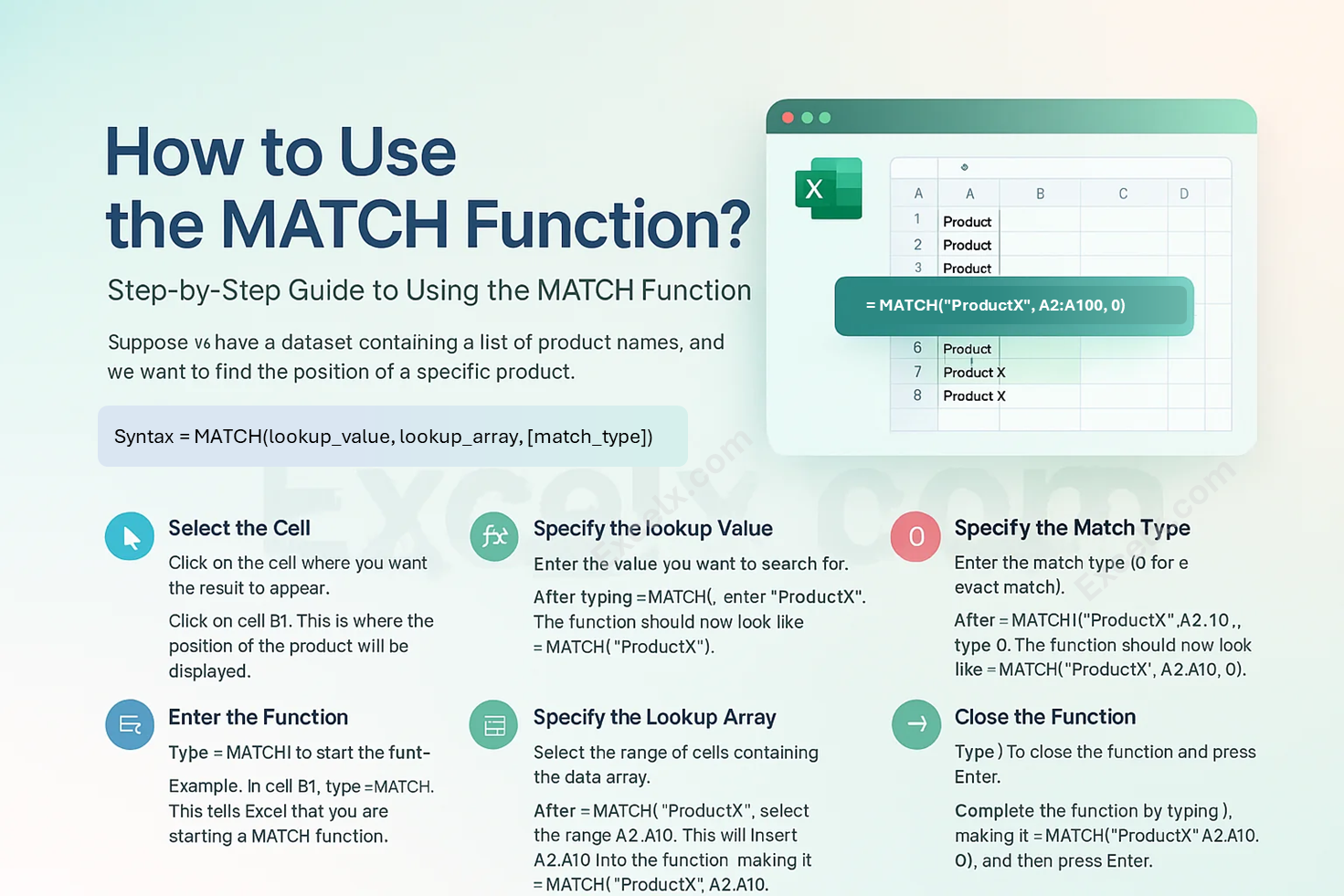
Match formula Excel can save you hours when you need to find something in a long list. Say you’ve got a sheet with hundreds of product IDs, and you need to know the position of a specific one. Instead of scrolling forever, you type in =MATCH(lookup_value, lookup_array, [match_type]), and Excel does the heavy lifting. It’s not just for numbers—it works with text, dates, and even wildcards if you set it up right.
It’s one of those formulas that feels like a secret weapon once you get the hang of it. Sure, XLOOKUP is flashier, but match formula Excel is faster for grabbing a position, not a value. Plus, it plays well with INDEX for more advanced lookups. If you’re still manually searching for data, this is your cue to stop.
Find positions, not just values
The match formula in Excel is all about locating where something sits in a list. It’s perfect for anyone who needs to map data between sheets or check if an item exists. Marketers use it to match campaign IDs to results, inventory managers track stock locations, and HR teams map employee IDs to departments.
Set up your sheet with two columns: one for your lookup list (e.g., product IDs) and one for the data you’re matching against (e.g., sales numbers). Keep the lookup list sorted if you’re using match_type 1 (exact or next smallest). Add a third column for the formula itself, and a fourth for any error handling with IFERROR.
| Product ID | Sales | Position | Formula |
|---|---|---|---|
| 101 | 250 | =MATCH(101, A2:A100, 0) |
|
| 102 | 300 | =MATCH(103, A2:A100, 1) |
|
| 103 | 150 | =MATCH("104", A2:A100, 0) |
The first formula returns 1 because 101 is the first item in the list. The second returns 5 since 103 isn’t there, but 105 is the next smallest. The third returns #N/A because "104" (as text) doesn’t match 104 (as a number).
Common mistake: Using match_type 1 on unsorted data. Excel won’t throw an error, but it’ll give you wrong results. Fix it by sorting the lookup array or switching to match_type 0 for exact matches.
Pair it with INDEX for dynamic lookups
The real power of match formula Excel comes when you combine it with INDEX. Together, they let you pull values from a table based on a lookup, without hard-coding cell references. This is how you build dynamic dashboards or reports that update automatically.
Create a table with Ctrl+T, then add a separate cell for your lookup value (e.g., "Q1 Sales"). Below it, set up a formula like =INDEX(table_array, MATCH(lookup_value, lookup_column, 0), return_column). Use IFERROR around it to catch missing data.
| Quarter | Region | Sales | Formula |
|---|---|---|---|
| Q1 | East | 500 | |
| Q1 | West | 700 | |
| Q2 | East | 600 |
Formula in D2: =IFERROR(INDEX(B2:B4, MATCH("Q1", A2:A4, 0), 2), "Not Found"). Returns 500 for Q1 East sales.
Common mistake: Forgetting to lock cell references with $. If you drag the formula down, A2:A4 should be $A$2:$A$4 to keep it anchored.
Handle errors and wildcards
Match formula in Excel breaks if it can’t find what you’re looking for. Wrap it in IFERROR to show a custom message instead of #N/A. If you’re working with partial matches, use wildcards by switching to match_type 0.
Add a data validation dropdown in your lookup cell to avoid typos. Go to Data > Data Validation > List, and point it to your lookup array. This keeps inputs consistent.
| Item | Price | Lookup | Result |
|---|---|---|---|
| Apple | 1.50 | p | 1 |
| Banana | 0.75 | n | 2 |
| Cherry | 2.00 | Peach | Not Found |
Formula in D2: =IFERROR(MATCH(C2 & "", A2:A4, 0), "Not Found"). For p, it returns 1 because "Apple" contains “p”.
Common mistake: Storing numbers as text. If your lookup value is 101 (number) but your array has "101" (text), the formula fails. Fix it with Data > Text to Columns > Finish to convert.
Build a lookup tracker
Turn match formula Excel into a reusable tracker by adding conditional formatting and filters. This works great for inventory logs, expense trackers, or project checklists. Highlight matches with Home > Conditional Formatting > New Rule > Use a formula.
Set up a filter on your lookup column (Ctrl+Shift+L) so you can narrow down results. Freeze the top row (View > Freeze Panes) if your sheet is long.
| Task ID | Status | Due Date | Priority |
|---|---|---|---|
| 001 | Done | 2023-10-15 | High |
| 002 | Pending | 2023-10-20 | Medium |
| 003 | Done | 2023-10-25 | Low |
Formula in E2: =IF(ISNUMBER(MATCH(A2, $A$2:$A$4, 0)), "Found", ""). Add conditional formatting to highlight “Found” cells.
Common mistake: Merging cells in your lookup array. Merged cells break formulas. Unmerge them with Home > Merge & Center > Unmerge Cells.
Try building a simple inventory tracker next. Use match formula Excel to flag low-stock items, and pair it with COUNTIFS to tally quantities.
Related: Understanding the Youth Sizes Chart
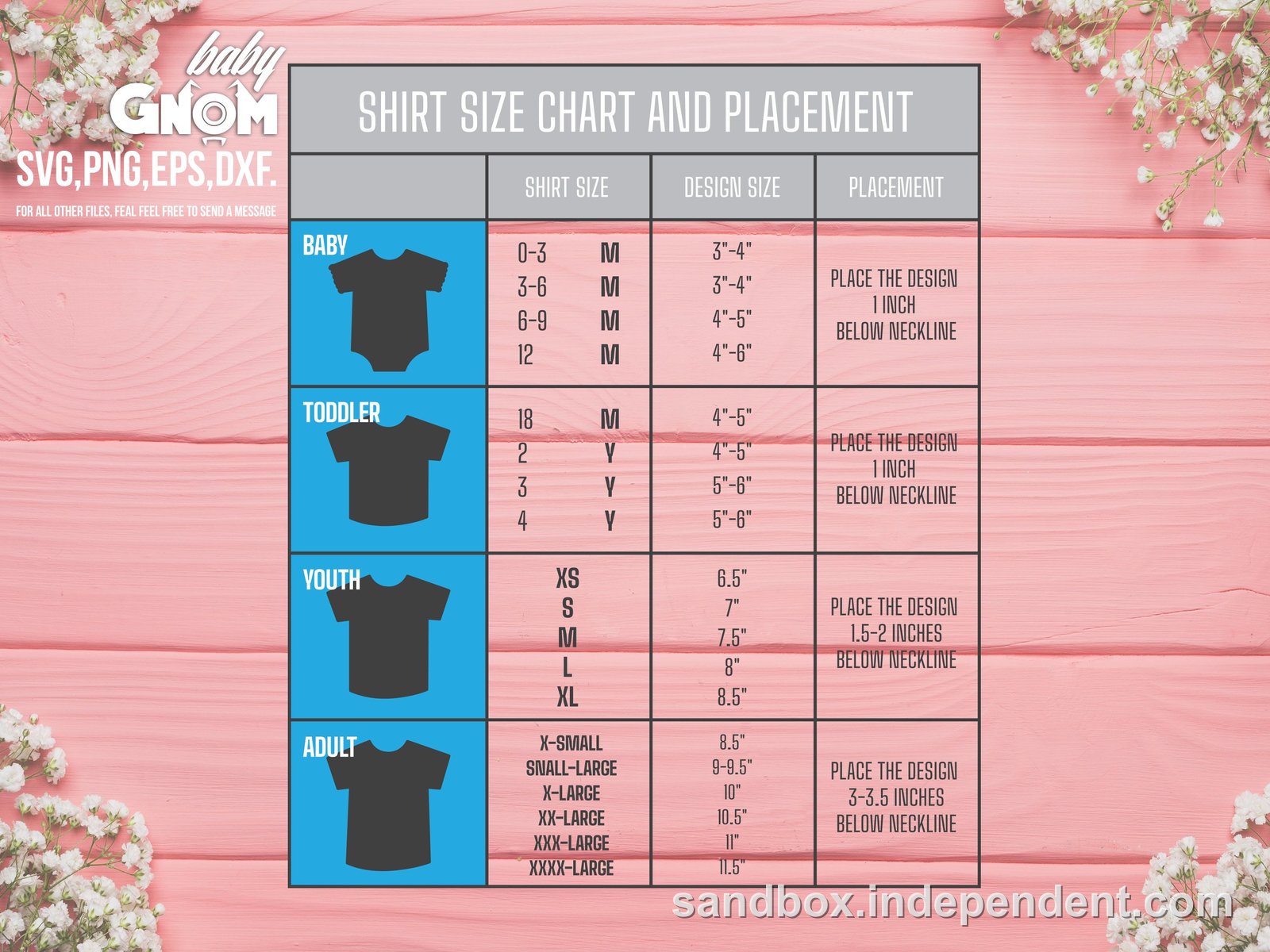
Many folks assume that a youth sizes chart is just for clothes, but it's so much more! While it's true that these charts are essential for nailing the perfect fit in kids' clothing, they also cover a wide range of products, from shoes to sports gear. A quick glance at a youth sizes chart can save you time and ensure an accurate fit, whether you're shopping for your own kids or buying a gift.
Understanding the Youth Sizes Chart
The youth sizes chart is a handy reference tool for parents and caregivers to navigate the world of kids' clothing and footwear sizing. It provides a standardized guide to help you choose the right size for your child, ensuring a comfortable and well-fitted outfit. This chart is a valuable resource, especially when shopping online or for specific brands, as it can vary from the standard.
Comparing Standards and Formats
There are a few key standards and formats to be aware of when using a youth sizes chart. The most common are the US standard, which is widely used in North America, and the metric or international standard, which is more prevalent in Europe and many other parts of the world. These standards may have slight variations in measurements and categories, so it's essential to know which one you're dealing with. Additionally, some brands might have their own unique sizing systems, especially for specialized sportswear or fashion lines.
Step-by-Step Guide to Using the Chart
Here's a simple process to follow when using a youth sizes chart:
Identify the standard: Determine whether you're using the US or metric standard. This information is usually indicated on the chart or provided by the retailer.
Measure your child: Take accurate measurements of your child's body, including height, weight, and key dimensions like chest, waist, and hip circumference. You can use a measuring tape or refer to existing measurements if you have them.
Locate the relevant category: Using the measurements, find the corresponding size category on the chart. This will typically involve matching height and weight ranges or specific body measurements.
Check the brand's fit: Some brands may have a slightly different fit or style, so it's a good idea to check their size guide or reviews to ensure the chosen size will fit as expected.
Consider growth: If you're buying for a growing child, you might want to opt for a slightly larger size to allow for growth spurts. Just ensure it's not too loose, as this can affect comfort and safety, especially with footwear.
Common Misreadings and How to Avoid Them
One of the most common mistakes is assuming that all brands and retailers use the same sizing standards. Always double-check the specific brand's guidelines or consult the youth sizes chart for that particular brand if available. Another pitfall is relying solely on age-based sizing, as children's growth rates vary, and this method may not always provide an accurate fit. It's best to measure your child and refer to the chart for a more precise size recommendation.
Factors Affecting Accuracy
When using a youth sizes chart, keep in mind these key factors that can influence the accuracy of the size selection:
Growth spurts: Children's bodies can change rapidly, so regular measurements are essential to ensure the chosen size is still appropriate.
Brand variations: As mentioned, different brands may have unique sizing systems, so always check their guidelines.
International travel: If you're shopping while traveling abroad, be aware of the different standards and ensure you're using the correct chart or guidelines.
Activity-specific sizing: For sports or specialized clothing, the fit and sizing may differ, so consider the purpose of the garment.
Adapting the Chart for Specific Needs
While the youth sizes chart provides a general guide, you might need to adapt it for specific situations. For example, if your child has a unique body shape or is particularly tall or short for their age, you may need to adjust the size selection accordingly. Some charts offer extended size ranges or special categories for these cases. It's also worth noting that certain clothing items, like coats or jackets, may have a more relaxed fit, so you might opt for a larger size to allow for layering.
Keeping Your Reference Reliable
To ensure you have a reliable reference for future purchases, consider the following:
Update measurements: Regularly measure your child's body dimensions, especially during growth spurts or seasonal changes.
Save the chart: Keep a digital or physical copy of the youth sizes chart you're using, along with any brand-specific size guides.
Share with caregivers: If others, like grandparents or babysitters, are shopping for your child, ensure they have access to the correct sizing information.
Check for updates: Sizing standards and brand guidelines can change over time, so periodically review the charts and guides to stay up-to-date.
So, there you have it! You're now equipped with a comprehensive understanding of youth sizes and how to navigate the various charts and standards. Remember, it's always a good idea to cross-reference and ensure you're using the right measurements for your specific needs.
Feel free to explore our other guides for more practical tips and tricks. We've got you covered with a range of handy resources to make your life easier!