








Planner Stickers For Desktop Overview
I was thinking about starting a names for concrete business the other day, you know, something to do with construction and building. It got me wondering about the right name, something that would stand out and be memorable. So, I did some research and here's what I found...
Choosing a Name for Your Concrete Business
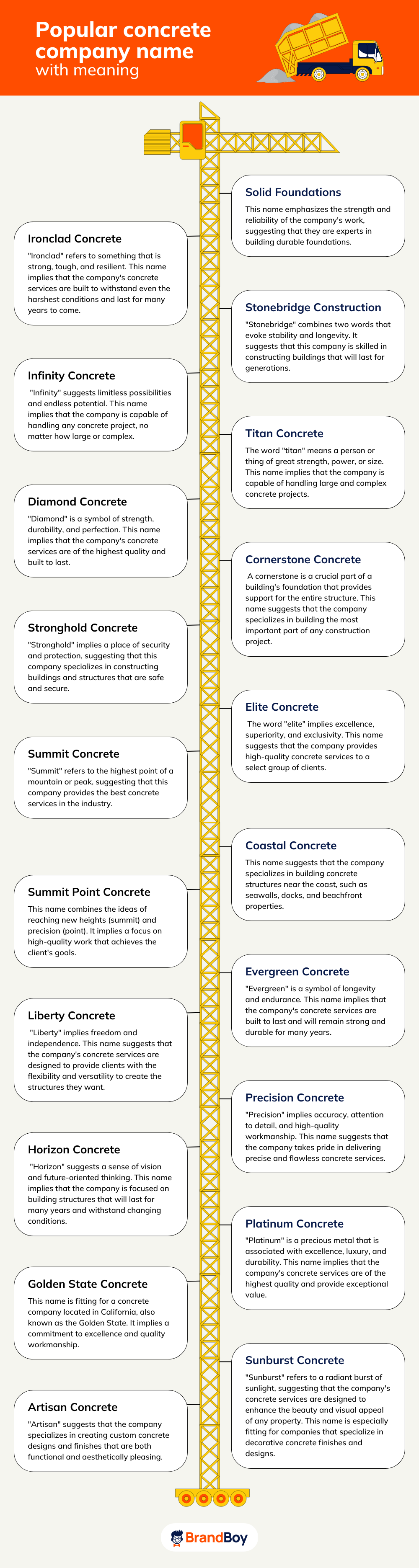
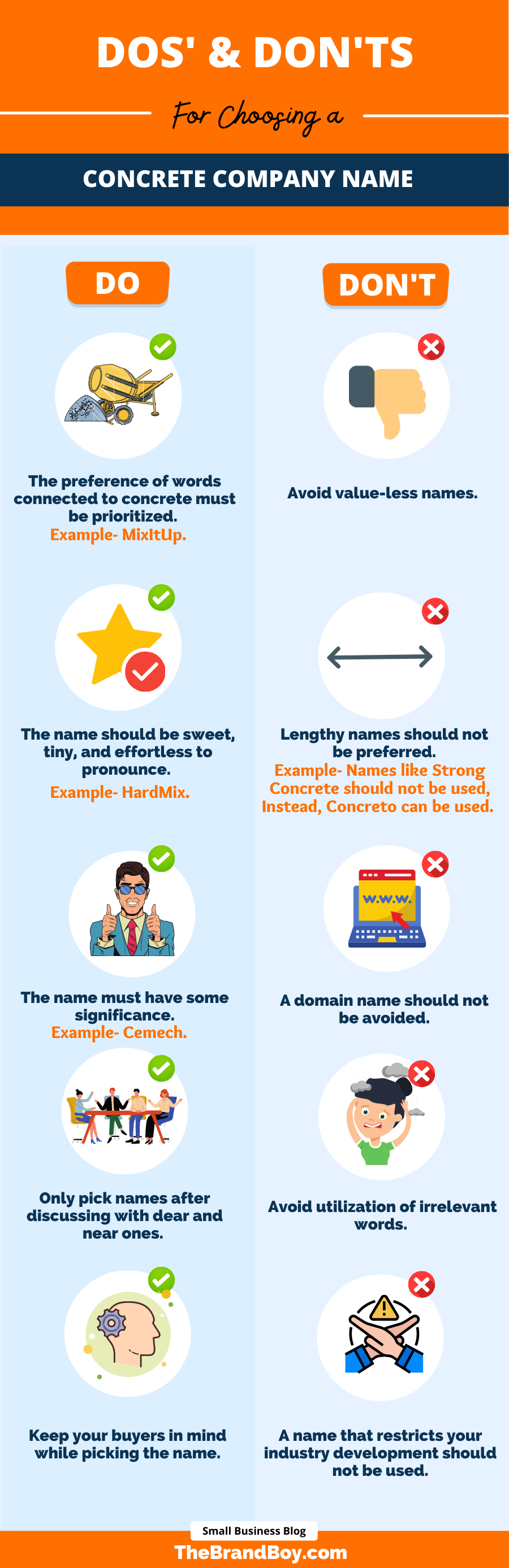
When it comes to naming your concrete business, you want something that reflects the strength and durability of the industry. A name that is catchy and easy to remember will help your business stick in people's minds. Consider words like "solid", "foundation", or "build" to convey a sense of stability and reliability.
What Makes a Good Name?
A good name for a concrete business should be unique and not too generic. Avoid common terms like "construction" or "builders" as these can be used by many different companies. Instead, focus on creating a name that is specific to your business and the services you offer. You could also consider using a play on words or a clever combination of words to make your business name memorable.
Example Names
Here are a few ideas to get you started:
- Solid Foundations
- Rock-Solid Builders
- Concrete Creations
- Build-It-Right
- Stronghold Construction
- Everlast Builders
Remember, these are just a few suggestions, and you can always get creative and come up with your own unique name.
Registering Your Business Name
Once you've settled on a name, you'll need to check its availability and register it. This process varies depending on your location, so it's best to contact your local business registration office or check their website for guidance. You'll also want to secure a domain name for your website and any social media handles to ensure your online presence is consistent.
Hiring a Contractor
If you're hiring a contractor for your project, whether it's a home renovation or a new build, it's important to do your research. Check their qualifications, experience, and references. Ask for a detailed quote, including a breakdown of costs, and compare it with other quotes to ensure you're getting a fair price. Don't be afraid to ask questions and seek clarity on any aspects of the quote you don't understand.
The Cost of Renovations
Renovation costs can vary greatly depending on the scope of the project, the materials used, and the location. It's always a good idea to get multiple quotes from different contractors to compare prices and ensure you're getting a competitive rate. Remember, the cheapest quote might not always be the best option, so consider the quality of the work and the reputation of the contractor too.
Industry Tools and Resources
There are various tools and resources available to help with construction and remodeling projects. RSMeans, for example, is a popular cost database used by professionals to estimate project costs. It provides accurate data on materials, labor, and other construction-related expenses. These tools can be beneficial for both contractors and homeowners to ensure projects stay on budget.
Construction Jobs and Salaries
The construction industry offers a range of job roles, from general contractors and estimators to specialized tradespeople. Salaries can vary depending on experience, qualifications, and the specific role. If you're looking for construction jobs, online job boards and local employment agencies are great places to start your search.
So, there you have it! A few insights into the world of names for concrete business. It's an exciting industry to be a part of, and with the right name and approach, you can build a successful business. Good luck!
Related: What's the best gravel size chart for my project?
A common misconception about gravel size charts is that they are solely for professionals or experts in the field. However, these charts are an accessible and valuable tool for anyone seeking accurate information on gravel sizing. The gravel size chart, often a simple table or diagram, provides a clear reference for understanding the various sizes and grades of gravel. It ensures you can make informed decisions, whether for landscaping, construction, or any project requiring specific gravel specifications.
Understanding the Gravel Size Chart: A Practical Guide
The gravel size chart is a valuable tool for anyone working with aggregates, offering a standardized way to categorize and understand the size distribution of gravel particles. This chart provides a visual representation of gravel sizes, making it easier to select the right type for various applications.
Comparing Standards and Formats
There are different standards and formats for gravel size charts, primarily based on the measurement system used. The most common are the US standard sizes and the metric system. US charts typically use inches or fractions of an inch, while metric charts employ millimeters. These charts also vary based on the specific application, such as construction, landscaping, or horticulture.
Step-by-Step Guide to Using the Gravel Size Chart
To accurately use a gravel size chart, follow these steps:
Identify the Standard: Determine whether you are working with a US or metric chart. This is crucial as the size categories and measurements differ significantly between the two systems.
Select the Right Chart: Choose a chart specific to your application. For instance, if you are landscaping, you might need a different chart than someone working on a construction project.
Understand the Categories: Familiarize yourself with the size categories on the chart. These categories often have specific names or codes, such as "pea gravel" or "2A Modified."
Measure and Compare: Take accurate measurements of the gravel you are working with. Compare these measurements to the categories on the chart to identify the closest match.
Consider Particle Distribution: Remember that gravel is a natural material, and its size distribution can vary. The chart provides a general guide, but actual samples may have some variation.
Convert if Needed: If you are working with a chart in a different system, you may need to convert the measurements. For instance, converting from inches to millimeters or vice versa.
Avoiding Common Misreadings and Pitfalls
Misinterpreting a gravel size chart can lead to incorrect selections. Here are some common mistakes to avoid:
Assuming Direct Equivalence: Gravel size charts provide a range of particle sizes, not exact measurements. Avoid selecting gravel based on a single number or assuming a direct match.
Ignoring Tolerances: Natural variations in gravel mean that the actual size distribution may differ slightly from the chart. Always consider the tolerance range when making selections.
Mixing Standards: Be cautious when working with charts from different standards. Converting measurements accurately is essential to avoid errors.
Factors Affecting Accuracy and Real-World Use
Several factors can influence the accuracy of a gravel size chart and its real-world application:
Source and Origin: Gravel from different sources or regions may have varying size distributions, even within the same category.
Processing and Screening: The method of processing and screening gravel can affect its size distribution. Different techniques may result in slightly different outcomes.
Environmental Factors: Weather conditions and erosion can impact the size and shape of gravel over time, especially in natural settings.
Application-Specific Requirements: Different projects have unique needs. Construction, for example, may require more precise size control than landscaping.
Adapting the Chart for Specific Needs
While gravel size charts provide a standardized guide, they may not cover every specific need. In such cases, you can adapt the chart or seek more detailed specifications:
Custom Size Categories: If your project requires a specific size not covered by standard charts, you can create custom categories based on your measurements.
Detailed Specifications: For precise projects, consult with experts or refer to detailed specifications provided by gravel suppliers or manufacturers.
On-Site Testing: In some cases, conducting on-site testing and analysis, such as sieve analysis, can provide more accurate data for your specific gravel source.
Well, I hope this gravel size chart and its accompanying guide have given you a clear and concise reference for your projects. Remember, while this chart provides a solid foundation, it's always a good idea to verify the specific requirements and standards relevant to your region or industry. Exact values can vary, so double-check to ensure you're using the right measurements for your context.
Consider bookmarking this page for future reference; it might come in handy when you least expect it! Until next time, happy measuring and stay organized.
Related: excel sum formula easy guide for fast totals
Understanding the Excel Sum Formula
The Excel Sum Formula is an essential tool for any Excel user, providing a simple yet powerful way to calculate sums and totals. Its versatility allows users to perform basic arithmetic operations and more advanced calculations with ease. By understanding and utilizing this formula, you can transform raw data into valuable insights, aiding in decision-making processes.
When employing the Excel Sum Formula, you initiate a series of calculations that aggregate data based on your specified criteria. This formula is particularly useful when dealing with large datasets, as it automates the process of adding up values, saving time and reducing the risk of errors. For instance, consider a scenario where you have a dataset containing sales data for various products over a month. You want to calculate the total sales for each product to identify the top-performing ones. The Excel Sum Formula comes to the rescue, allowing you to quickly sum up the sales figures for each product, providing a clear overview of your sales performance.
A Practical Example
Let's dive into a real-world application of the Excel Sum Formula in the context of a sales analysis. Imagine you're a marketing analyst, and you have a spreadsheet with columns for "Product", "Units Sold", and "Price per Unit". You want to calculate the total sales for each product to determine which products are performing well.
Here's a step-by-step guide:
- In a new column, labeled "Total Sales", input the formula
=SUM(Units Sold Price per Unit). - Ensure that the formula correctly references the "Units Sold" and "Price per Unit" columns. For example, if your data starts in row 2, the formula could be
=SUM(B2:B100C2:C100)where B and C represent the columns for "Units Sold" and "Price per Unit" respectively. - Drag the formula down to apply it to each row, calculating the total sales for each product.
Now, you have a column with the total sales for each product, allowing you to identify the top-selling products and make informed decisions regarding marketing strategies.
Common Mistake and How to Avoid It
One common mistake when using the Excel Sum Formula is failing to use absolute references when copying formulas across rows or columns. This can lead to incorrect calculations as the formula may reference unintended cells.
To avoid this mistake, use absolute references by adding a dollar sign ($) before the column and row references. For instance, if you want to lock the reference to column A and row 2, you would use $A$2. This ensures that when you copy the formula, it always refers to the same cell, regardless of its position in the spreadsheet.
Enhancing Your Excel Skills
Excel offers a wide range of features to enhance your data analysis capabilities. One such feature is the drop-down list, which can greatly improve the usability of your spreadsheets. By creating a drop-down list using the Data Validation feature, you can allow users to select from a predefined list of options, reducing data entry errors and ensuring consistency.
Additionally, the IF function is a powerful tool for conditional calculations. This function allows you to check a condition and return different values based on whether the condition is true or false. For example, you can use the IF function to highlight cells that meet certain criteria, automate data validation, or perform dynamic calculations based on specific conditions.
Final Thoughts
The Excel Sum Formula is a fundamental tool for data analysis, offering a simple and efficient way to calculate sums and totals. Its versatility and ease of use make it an indispensable skill for anyone working with data. As you continue to explore Excel's capabilities, you'll discover a wealth of advanced functions and features that will further enhance your data analysis skills. Remember, practice and experimentation are key to mastering Excel, so don't hesitate to dive deeper into its vast toolkit. Happy spreadsheeting and happy data analysis!