


Esl Xmas Worksheets Overview
A cigar size chart is a handy tool for any cigar enthusiast, offering a quick and easy way to understand cigar dimensions. This guide will take you through the basics, covering the essential info you need to read and interpret these charts like a pro.
From cigar ring gauge to length, these charts provide a simple visual reference, ensuring you can identify and choose the right cigar size. While values may vary, the cigar size chart remains a reliable starting point, offering a clear and consistent way to explore the world of cigar sizes.
Understanding Cigar Sizes: A Practical Guide
Cigar size charts are your go-to resource for navigating the world of cigars. They provide a visual representation of the various dimensions and formats cigars come in, helping you make informed choices. These charts typically showcase two key measurements: length and ring gauge. The ring gauge, often referred to as the diameter, is a critical factor in determining a cigar's burn and flavor.
Standard Cigar Dimensions: Comparing Formats
Cigar size charts offer a standardized way to understand cigar sizes. They present a range of common formats, each with its own name and unique dimensions. For instance, a robusto is typically around 5 inches long with a 50 ring gauge, while a toro might measure 6 inches with a 54 ring gauge. These charts provide a quick reference, allowing you to visualize the differences between various cigar sizes.
How to Use a Cigar Size Chart: A Step-by-Step Guide
- Identify the two primary measurements: length and ring gauge. These are usually displayed side by side or in a clear, tabular format.
- Match the length of the cigar you have or are considering with the chart's length column.
- Cross-reference the ring gauge to find the corresponding format. For example, if your cigar is 6 inches long and has a 52 ring gauge, it likely fits the description of a "Churchill."
- Understand the implications: Different sizes impact the smoking experience. Larger cigars may offer a longer, more complex smoke, while smaller ones provide a quicker, more focused flavor profile.
Common Misreadings and How to Avoid Them
One common pitfall is assuming all cigars within a size category are identical. While the ring gauge and length are standardized, other factors like brand, tobacco blend, and construction can vary. These nuances impact the smoking experience, so always consider the cigar's brand and specific details when making comparisons. Additionally, be mindful of regional variations; some countries may use different measurement systems or have unique size names.
Factors Affecting Accuracy and Real-World Use
Several variables can influence the accuracy of a cigar size chart. Firstly, the chart's origin matters; some are designed for specific regions or markets, so ensure you're using one relevant to your location. Secondly, while standardized, there can be slight variations in measurements across different manufacturers. Always check the cigar's packaging or official brand specifications for precise details. Lastly, remember that cigars, especially handmade ones, may have slight imperfections, so the chart serves as a guide rather than an absolute measurement tool.
Well, there you have it! A handy guide to cigar sizes, covering the main options, how to use the chart, and some common pitfalls to avoid. Remember, these measurements can vary slightly, so always double-check if precision is key.
Feel free to explore our other guides for more practical tips and tricks. We've got a whole range of topics to help you navigate the world of cigars and beyond!
Related: Find Your Perfect Steak: A Cook's Guide
A common misconception about the steak cook chart is that it's a rigid, one-size-fits-all guide, which can lead to over-complicating a simple cooking process. However, this chart is a versatile tool, offering a clear and concise way to achieve your desired steak doneness. It provides a straightforward reference for cooking temperatures and times, ensuring your steak is cooked to perfection every time. With the steak cook chart, you can easily navigate the different stages of doneness, from rare to well done, and understand the internal temperature guidelines.
Understanding Doneness: A Guide to Steak Cook Charts
Steak cook charts are a valuable tool for any cook, offering a visual guide to achieving the perfect steak doneness. These charts provide a simple yet effective way to understand and control the cooking process, ensuring your steak turns out just how you like it. Let's explore what these charts offer and how to use them effectively.
Comparing Cook Chart Standards and Formats
Steak cook charts typically present a range of doneness options, from rare to well done, and provide corresponding temperature ranges or times. These charts can vary slightly depending on the standard or region they follow. For instance, some charts may use Fahrenheit temperatures, while others opt for Celsius. It's essential to be aware of these variations and ensure you're using the right chart for your needs.
Step-by-Step Guide: Using a Steak Cook Chart
Using a steak cook chart is straightforward and can greatly improve your cooking accuracy. Here's a simple process to follow:
Choose the Right Chart: Select a chart that aligns with your cooking method and desired doneness. Different charts may cater to grilling, pan-frying, or even sous vide cooking.
Understand the Doneness Levels: Familiarize yourself with the doneness options on the chart. These often include terms like rare, medium-rare, medium, and well done, each with its temperature or time range.
Prepare Your Steak: Ensure your steak is at room temperature before cooking. This simple step can significantly impact the cooking process and final result.
Cook and Monitor: Follow your chosen cooking method and refer to the chart for guidance. Regularly check the internal temperature of your steak using a meat thermometer. This ensures you achieve the desired doneness without overcooking.
Rest and Serve: After cooking, allow your steak to rest for a few minutes. This resting period is crucial as it allows the juices to redistribute, ensuring a juicy and flavorful steak.
Avoiding Misreadings and Pitfalls
While steak cook charts are a fantastic tool, there are a few potential pitfalls to avoid:
Internal Temperature: Always use a reliable meat thermometer to check the internal temperature. Don't rely solely on the chart's time estimates, as cooking times can vary based on steak thickness and other factors.
Resting Times: Don't skip the resting step! It's a critical part of the process and can make a significant difference in the final doneness and juiciness of your steak.
Thickness and Size: Be aware that thicker steaks may require adjustments to cooking times or temperatures. Always consider the size and thickness of your steak when using a cook chart.
Key Factors for Accurate Results
Several factors can influence the accuracy of your steak cook chart readings:
Cooking Method: Different cooking methods, such as grilling or pan-frying, can impact doneness. Ensure your chart aligns with your chosen method.
Steak Thickness: Thicker steaks may require longer cooking times or higher temperatures to achieve the desired doneness.
Room Temperature: Allowing your steak to reach room temperature before cooking can ensure more consistent and accurate results.
Resting Times: As mentioned, resting times are crucial. A well-rested steak will be juicier and more flavorful.
Personal Preference: Remember, these charts provide a guide, but your personal preference is key. Adjust temperatures or times slightly to find your perfect steak doneness.
By understanding these factors and following the simple steps outlined, you'll be well on your way to achieving the perfect steak every time, using the steak cook chart as your trusted guide.
Your steak cook chart is a valuable tool, a quick reference guide to ensure delicious results every time. It offers a clear path to cooking perfection, and with its step-by-step guidance, you'll soon master the art of steak cooking.
Remember, while this chart provides a solid framework, your personal preferences and the specific steak you're cooking may require some adjustments. So, keep an eye on your steak, trust your instincts, and don't be afraid to make those subtle tweaks to get the doneness just right. It's all about finding that perfect balance!
Related: excel sum formula easy guide for fast totals
Understanding the Excel Sum Formula
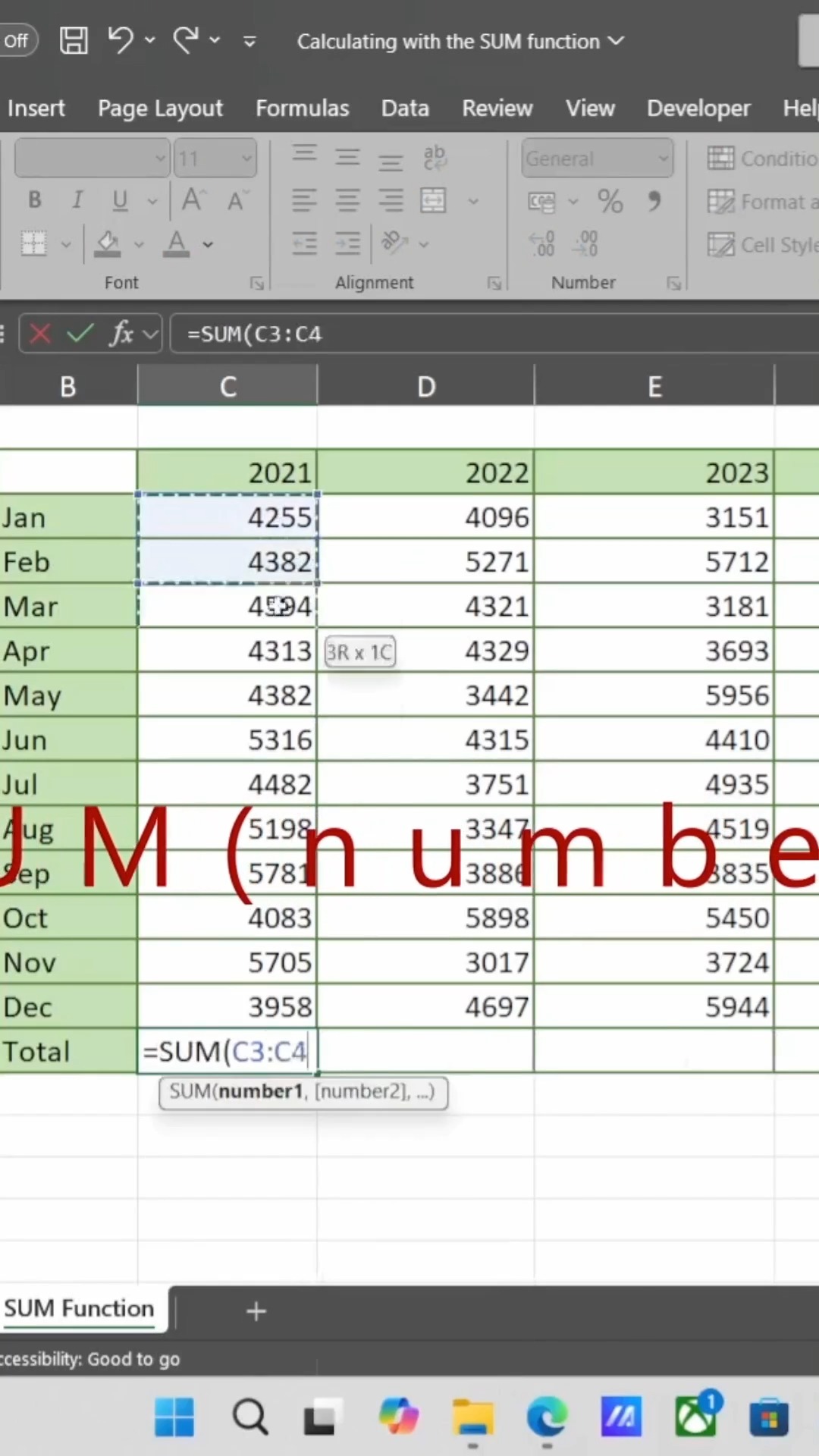
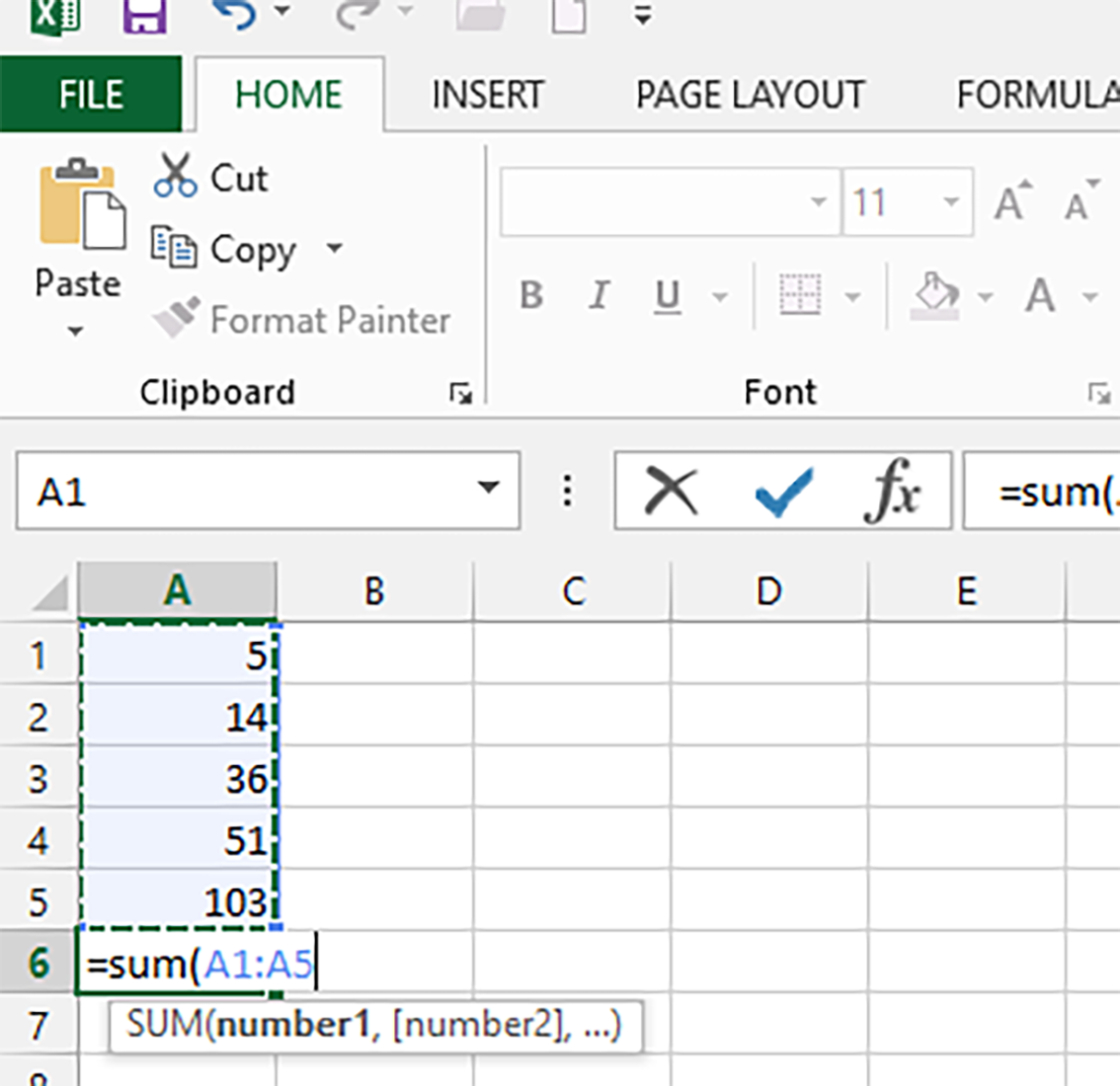
The Excel Sum Formula is an essential tool for any Excel user, providing a simple yet powerful way to calculate sums and totals. Its versatility allows users to perform basic arithmetic operations and more advanced calculations with ease. By understanding and utilizing this formula, you can transform raw data into valuable insights, aiding in decision-making processes.
When employing the Excel Sum Formula, you initiate a series of calculations that aggregate data based on your specified criteria. This formula is particularly useful when dealing with large datasets, as it automates the process of adding up values, saving time and reducing the risk of errors. For instance, consider a scenario where you have a dataset containing sales data for various products over a month. You want to calculate the total sales for each product to identify the top-performing ones. The Excel Sum Formula comes to the rescue, allowing you to quickly sum up the sales figures for each product, providing a clear overview of your sales performance.
A Practical Example
Let's dive into a real-world application of the Excel Sum Formula in the context of a sales analysis. Imagine you're a marketing analyst, and you have a spreadsheet with columns for "Product", "Units Sold", and "Price per Unit". You want to calculate the total sales for each product to determine which products are performing well.
Here's a step-by-step guide:
- In a new column, labeled "Total Sales", input the formula
=SUM(Units Sold Price per Unit). - Ensure that the formula correctly references the "Units Sold" and "Price per Unit" columns. For example, if your data starts in row 2, the formula could be
=SUM(B2:B100C2:C100)where B and C represent the columns for "Units Sold" and "Price per Unit" respectively. - Drag the formula down to apply it to each row, calculating the total sales for each product.
Now, you have a column with the total sales for each product, allowing you to identify the top-selling products and make informed decisions regarding marketing strategies.
Common Mistake and How to Avoid It
One common mistake when using the Excel Sum Formula is failing to use absolute references when copying formulas across rows or columns. This can lead to incorrect calculations as the formula may reference unintended cells.
To avoid this mistake, use absolute references by adding a dollar sign ($) before the column and row references. For instance, if you want to lock the reference to column A and row 2, you would use $A$2. This ensures that when you copy the formula, it always refers to the same cell, regardless of its position in the spreadsheet.
Enhancing Your Excel Skills
Excel offers a wide range of features to enhance your data analysis capabilities. One such feature is the drop-down list, which can greatly improve the usability of your spreadsheets. By creating a drop-down list using the Data Validation feature, you can allow users to select from a predefined list of options, reducing data entry errors and ensuring consistency.
Additionally, the IF function is a powerful tool for conditional calculations. This function allows you to check a condition and return different values based on whether the condition is true or false. For example, you can use the IF function to highlight cells that meet certain criteria, automate data validation, or perform dynamic calculations based on specific conditions.
Final Thoughts
The Excel Sum Formula is a fundamental tool for data analysis, offering a simple and efficient way to calculate sums and totals. Its versatility and ease of use make it an indispensable skill for anyone working with data. As you continue to explore Excel's capabilities, you'll discover a wealth of advanced functions and features that will further enhance your data analysis skills. Remember, practice and experimentation are key to mastering Excel, so don't hesitate to dive deeper into its vast toolkit. Happy spreadsheeting and happy data analysis!