





Summertime Word Search Printable Overview
Many users assume they need to download extra files to get rose flower cliparts in Office. In reality, the built‑in clip art library already contains them, and you can insert them directly into Excel or Word.
If you’re adding a graphic to PowerPoint or setting a background in Teams, just use the Insert Picture feature or the clip art browser. The same images are available across Microsoft 365 clip art, so you don’t have to search elsewhere. Depending on your version, the menu labels might vary slightly, but the process stays simple.
Insert picture Excel with rose flower cliparts
The built‑in clip art library already includes rose flower cliparts. You can insert them directly into Excel, Word, or PowerPoint without extra downloads.
In Excel, go to Insert > Picture > This Device, browse the clip art folder and select a PNG rose file. The same steps work in Word and PowerPoint using Insert > Pictures > Stock Images.
The Microsoft 365 clip art collection appears in all Office apps, so you can reuse the rose graphic across documents. Menu labels may vary, but Insert > Picture is the consistent entry point.
If the rose design doesn’t appear, ensure you’re online and signed into a Microsoft 365 account. This opens the online library where the rose images are stored.
For faster access, press Alt+N, P to open the Insert Picture dialog directly. You can also type “rose” in the search box to filter results instantly.
Clip art library requirements: version and account type
The clip art library is included with Office 2019 and Microsoft 365, so no separate download is required for rose flower designs. To use the online library you need a Microsoft 365 subscription and an internet connection; a free Microsoft account also works for the web version.
In corporate environments the online clip art feature can be disabled via policy. If the rose images are missing, ask IT to enable the Microsoft 365 clip art service.
If you’re on an older Office version such as 2016, the offline set may not contain the rose. You can still use the online library by signing in.
When you select the rose from the library, the file is a PNG that can be resized without loss of quality. You can then drag it onto any slide for a polished look with rose flower cliparts.
Step‑by‑step OneNote drawing with rose flower cliparts
To add a rose graphic in OneNote, open the app and choose Insert > Picture > This Device (or Stock Images for the online library). Browse to the clip art folder and select a PNG rose file.
Open OneNote and select the target page.
Click Insert > Picture > This Device (or Stock Images) and locate the rose PNG.
Select the rose file and insert it onto the page.
Resize or reposition using the picture handles as needed.
Save the page; the rose clip art is now part of your OneNote drawing.
If the rose doesn’t appear, confirm you’re online and signed into a Microsoft 365 account; otherwise the offline clip art may not include the design. You can also paste a copied rose image directly into OneNote for immediate use.
Signature image Outlook issues and fixes
When you add a rose clipart as an Outlook signature, the image may disappear or leave the signature blank. This often happens if the file size or format isn’t compatible.
- Signature image exceeds Outlook’s 30 KB size limit.
- File format isn’t supported (e.g., transparent GIF).
- Signature set to plain text only.
- Microsoft 365 clip art service disabled by policy.
To fix, resize the PNG under 30 KB, use a supported format like PNG or JPG, and switch the signature format to HTML or RTF. After saving, test the signature in a new message.
If the problem persists, verify you’re online and signed into a Microsoft 365 account; otherwise the rose image won’t load. After correction, the same rose clip art can be reused in other Office apps.
Slide design PowerPoint best practice with rose flower cliparts
The built‑in clip art library already includes rose flower cliparts, so you can insert them directly into PowerPoint without extra downloads. Use Insert > Pictures > Stock Images to browse the library.
Start with the high‑resolution rose from the Microsoft 365 clip art library for a clean slide design. This ensures the graphic looks sharp when projected.
If you use a custom rose, insert it via Insert > Picture > This Device, then set the picture’s fill to “Aspect Ratio” in Picture Format. Resizing this way prevents distortion.
Add the rose to the slide master’s header area so it appears on all new slides automatically. You can also copy the PNG to a shared folder for consistent branding across presentations.
Give it a go on a spare worksheet or a test slide first, just to be safe. If everything looks right, you can apply the same steps to your actual file. Menus might look a bit different depending on your version, but the ideas stay the same.
When you need this again, just bookmark the page and you’ll have it handy. Happy editing!
Related: Unravel the pt chart 410a Mystery
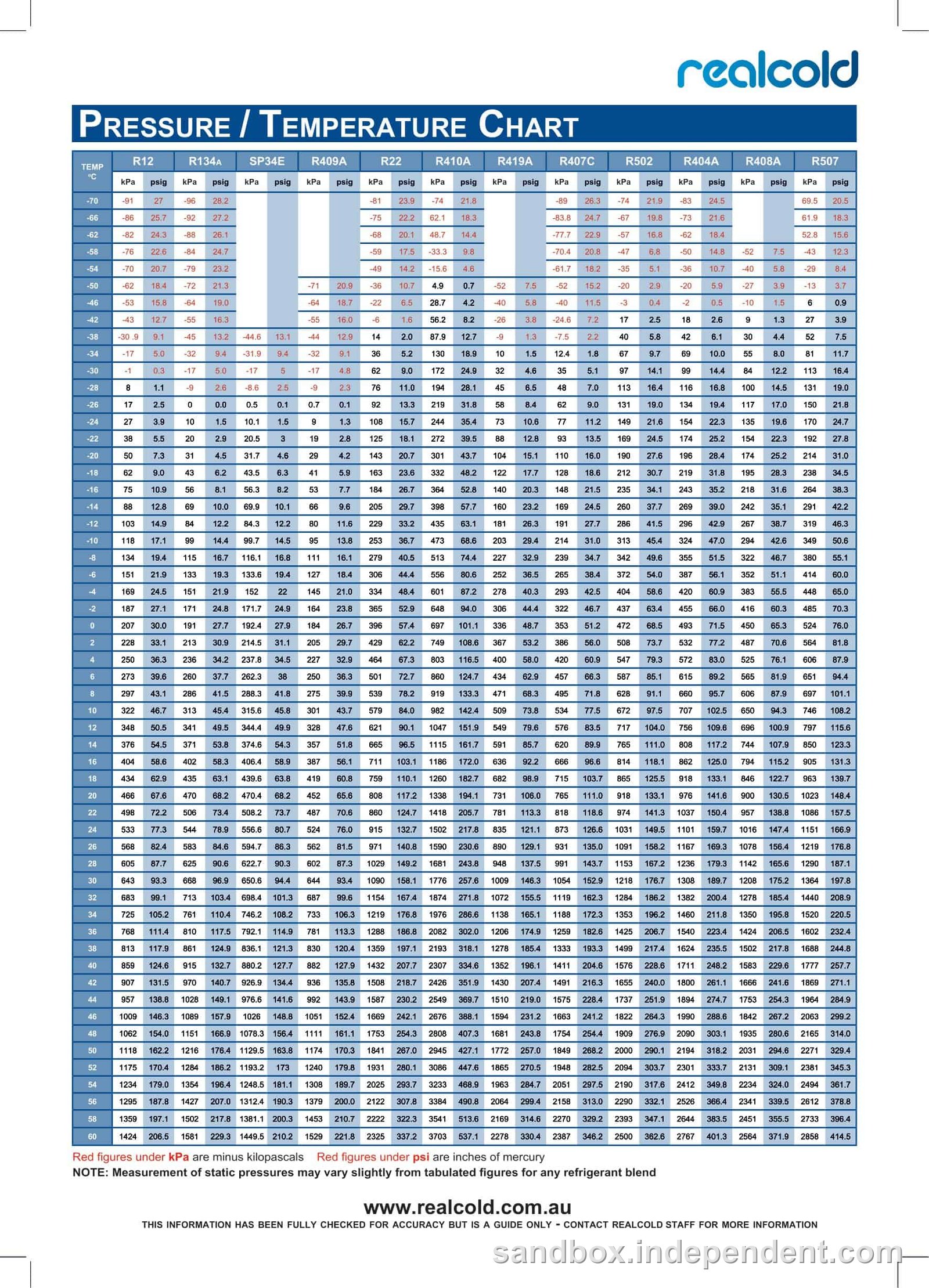
Hey there! Let's talk about PT Chart 410a, a handy tool for anyone working with refrigerants and air conditioning systems. This guide will give you a quick rundown on how to use and read this chart effectively.
The PT Chart 410a is a visual reference, providing insights into the relationship between pressure and temperature for a specific refrigerant. While the values may vary slightly depending on your region or the specific brand of refrigerant, this chart is a reliable starting point for understanding these critical variables. It's worth noting that there are similar charts for other refrigerants, like PT Chart 410b and Pressure Temperature Chart R134a, which we won't cover here.
Understanding the PT Chart 410a
The PT chart 410a is a handy reference tool for anyone working with refrigeration or air conditioning systems. It's a visual guide that helps you understand the relationship between pressure and temperature for a specific refrigerant, in this case, R410a. Think of it as a map that shows you how these two factors are connected, making it easier to diagnose issues and make adjustments.
Comparing Standards and Formats
While there are different versions of PT charts, the 410a is designed for a particular type of refrigerant. Other charts, like the 410b or r134a, are tailored to different refrigerants. These charts use standard pressure units, usually in psi (pounds per square inch) or kPa (kilopascals), and temperature in degrees Fahrenheit or Celsius. It's important to use the right chart for your specific refrigerant to ensure accurate readings.
Step-by-Step Guide to Using the PT Chart 410a
- Identify the refrigerant you're working with. In this case, it's R410a, so you'll need the corresponding PT chart.
- Locate the pressure and temperature values on the chart. The chart will have a grid-like structure with pressure on one axis and temperature on the other.
- Find the intersection point of your desired pressure and temperature. This point will give you an idea of the refrigerant's state, whether it's a liquid, gas, or a mixture.
- Use this information to make adjustments or diagnose issues. For example, if the pressure is too high for the given temperature, you might need to release some refrigerant.
Avoiding Common Misreadings
One of the most common mistakes is using the wrong chart for your refrigerant. Always double-check you're using the correct PT chart 410a for R410a refrigerant. Another pitfall is misinterpreting the chart's data. Remember, the chart provides a general guide, and real-world conditions might vary slightly. Always consider other factors like humidity and the system's overall health.
Key Factors Affecting Accuracy
- Pressure and Temperature: These are the primary variables, and their accuracy is crucial. Ensure your pressure gauge and temperature sensor are calibrated and functioning correctly.
- Humidity: Moisture in the air can affect the system's performance and the readings on your chart. Consider using a dehumidifier if needed.
- System Age and Condition: Older systems or those with leaks or blockages may not behave exactly as the chart predicts. Regular maintenance is key.
- External Factors: Environmental conditions like extreme temperatures or high altitudes can impact the system's performance.
Choosing the Right PT Chart for Your Needs
While the PT chart 410a is designed for R410a refrigerant, there are variations and adaptations for different applications. If you're working with a different refrigerant, such as r134a, you'll need to use the corresponding chart. Always refer to the manufacturer's guidelines and industry standards to ensure you're using the correct chart for your specific system and refrigerant.
Hey there! I hope this guide has given you a clear understanding of the PT Chart 410a and its practical uses. Remember, while the basics remain the same, there might be slight variations in the details, so always double-check for your specific needs.
Feel free to bookmark this page for future reference; it's always handy to have a quick, reliable guide at your fingertips. And don't forget to explore our other guides too; there's always something new to learn and discover!
Related: Public Listed Construction Company Essential Guide
I was walking past a busy construction site the other day, and it got me thinking about public listed construction companies. Who are these firms, and what do they do? Well, let's find out!
Understanding Public Listed Construction Companies
A public listed construction company is a business that builds and renovates structures, from homes to commercial buildings, and everything in between. These companies are often large-scale operations, with the resources to take on major projects. They might construct new buildings from the ground up or handle complex renovations and additions. The key here is that these companies are publicly listed, which means their shares are traded on a stock exchange and anyone can invest in them.
So, why does this matter? Well, for one, it means these companies are usually well-established and financially stable. They have the backing of investors and the public market, which can be a good sign of their long-term viability. This stability is important when you're considering hiring a contractor for a big project. You want to know they'll be around to honor their warranty and provide ongoing support.
Hiring a Contractor: What to Look For
When you're in the market for a contractor, whether it's for a home renovation or a new build, there are a few key things to consider. First, check their licensing and insurance. Make sure they're properly registered and insured for the work they do. This protects you in case of accidents or issues down the line. Next, ask for references and check their online reviews. Seeing what past clients have to say can give you a good idea of the company's reliability and quality of work.
It's also important to get multiple quotes. Prices can vary widely, and you want to make sure you're getting a fair deal. Compare apples to apples though; make sure the scope of work is the same across all quotes. And don't forget to ask about the timeline. A good contractor will give you a realistic estimate of how long the project will take, and they should be able to explain any potential delays.
Naming Your Construction Business
If you're in the construction business or thinking of starting one, you'll need a great name. A catchy, memorable name can help you stand out and make a good first impression. But what makes a good name? It should be unique, easy to remember, and reflect your business's personality or services. Avoid names that are too generic or could be confused with other businesses.
Here are a few original name ideas:
- BuildCraft
- Renova Solutions
- StructureWorks
- HomeRevamp
- ConstructoPros
- BuildTech
Remember to check the availability of these names and secure the relevant domains and local registrations before you finalize your choice.
The Construction Industry: A Quick Overview
The construction industry is a vast and diverse field, with roles ranging from general contractors to specialized tradespeople. Estimators, for example, play a crucial role in calculating costs and providing accurate quotes. Then there are project managers, who oversee the entire operation, ensuring it stays on track and within budget. These jobs can be found through various channels, including online job boards, industry-specific websites, and even word-of-mouth recommendations.
Data and Tools: RSMeans and More
In the construction world, tools like RSMeans are essential. RSMeans provides cost data and estimating tools, helping contractors and companies accurately price their work. It's a valuable resource for staying competitive and ensuring projects are financially viable. Similarly, cost databases and indexes are used to track and predict construction costs, helping businesses plan and budget effectively.
Large vs. Small Construction Firms
The construction industry is diverse, with a range of company sizes. Large firms often have the resources to take on big, complex projects and may have a national or even international presence. They can offer a wide range of services and have the manpower to handle multiple projects simultaneously. On the other hand, smaller firms might specialize in a particular area, like home renovations, and offer a more personalized service. They might be better suited to local projects and have a strong understanding of the specific market and its needs.
So, there you have it! A quick dive into the world of public listed construction companies. Whether you're looking to hire a contractor or just curious about the industry, I hope this gives you a better understanding of what these companies do and how they operate.